Start with the Switch Panel for everyday cockpit controls, add the Multi Panel for autopilot changes, and add the Radio Panel once you want physical dials for tuning frequencies instead of clicking through the sim.
Flight sim panels put real switches and knobs in front of you, with lights that show their state. Without them, those controls hide in menus you click with a mouse. A panel is usually the next buy after a stick or yoke. It makes sense once you fly often enough to want faster access to system controls, the autopilot and the radios.
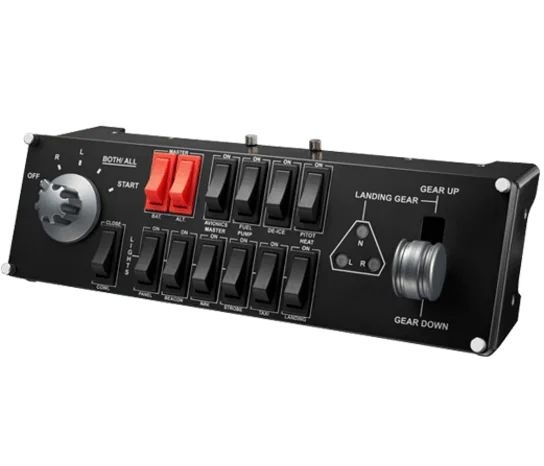
#1. Logitech G Pro Flight Switch Panel: best first panel for everyday switches
Keep in mind: its listing names FSX, Prepar3D and X-Plane, not the newer MSFS releases.
Logitech's spec sheet lists a top row of switches for the battery, the alternator and the avionics master. The same row has the fuel pump, de-ice and pitot heat. The bottom row covers cowl flaps and panel lights, then beacon, nav and strobe lights. Taxi lights, landing lights and the gear lever sit there too.
A 5-way rotary switch runs the magnetos. The panel plugs in over USB 2.0. LED lights show the state of each switch at a glance.
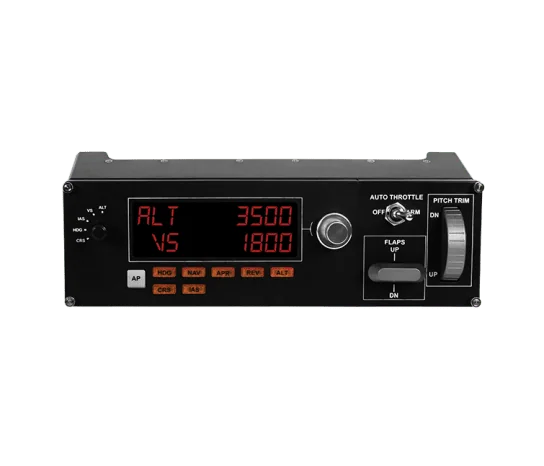
#2. Logitech G Pro Flight Multi Panel: best panel for autopilot changes
Keep in mind: its listing names FSX and older sims, not the newer MSFS releases.
The Multi Panel adds autopilot mode buttons, an LED readout and knobs to set values. Logitech's product text says it mounts right onto the Pro Flight Yoke System, or into your own cockpit build. You turn a knob to change a heading or height target. You don't have to click through a menu mid-flight.
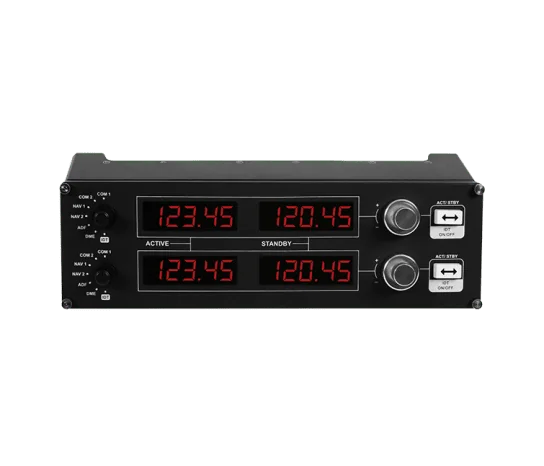
#3. Logitech G Pro Flight Radio Panel: best panel for tuning frequencies
Keep in mind: its listing names FSX, X-Plane and Prepar3D, not the newer MSFS releases.
The Radio Panel uses twin stacked dials to tune frequencies. A switch swaps the standby and active frequency. LED screens follow the sim in real time. On a long flight with many radio changes, that saves a lot of mouse work.
Factors to consider when choosing flight sim panels
Aircraft type matters more than an exact match
You don't need a panel that matches your exact plane. Matching the general type helps, though. Logitech's Switch Panel and Multi Panel are built around small-plane systems. Think magnetos, a fuel pump and general autopilot modes. So they fit single-engine and light twin flying well.
For airliners, some simmers add a panel built for one jet family's autopilot. GoFlight's GF-MCP Pro is one example, modeled on a Boeing 737NG mode control panel. We don't carry a product box for it, since it sits outside our current lineup. It is still good to know the type exists, if Logitech's general autopilot panel isn't specific enough for the jet you fly.
Confirm sim support first
Logitech's listings for all three panels name Flight Simulator X, Prepar3D and X-Plane. None of them state support for MSFS 2020 or 2024. If you fly one of the newer Microsoft sims, check that your setup works before you buy.
Buying order matters
Most simmers buy the Switch Panel first. Its battery and avionics switches, plus the fuel pump, get used on nearly every flight, whatever the plane. The Multi Panel is a natural second buy once you want faster autopilot changes than a menu gives you. The Radio Panel usually comes last. Frequency tuning matters most once you fly longer routes with more radio changes along the way.
Mounting and desk space
Each panel is its own box, so plan where they will sit. The Multi Panel can mount onto Logitech's Pro Flight Yoke System, which keeps it close to your hands. Panels can also go into a cockpit frame or a panel stand. On a plain desk, keep them within easy reach of your main control. A switch you have to lean for is a switch you won't use.
Setup and binding
Each panel plugs into its own USB port. A powered USB hub helps once you run three panels plus a stick and throttle. You bind switches and dials to sim functions in your sim's controls menu, or with Logitech's software. Expect some setup time the first evening. Default bindings rarely line up with a new panel on their own.
Verdict: which flight sim panels to buy
These flight sim panels are for someone who already has a stick, yoke or throttle and wants to know what a panel adds. Start with the Switch Panel, since it covers the controls you touch on nearly every flight. Add the Multi Panel next for autopilot changes. Then add the Radio Panel once you want real dials for tuning instead of a screen you click. Add flight sim panels one at a time, starting with the one you reach for most.
FAQ
What does a flight sim panel actually add?
Physical switches, dials and lights for things you'd otherwise click through with a mouse: engine and system switches, autopilot mode changes, and radio frequency tuning. It speeds up in-flight changes and adds realism.
Do I need a panel that matches my exact aircraft?
Not exactly, but matching the general aircraft category helps. Logitech's panels are built around general-aviation systems, so they map well onto single-engine and light twin flying rather than a specific airliner's autopilot layout.
Do these panels work with newer versions of Microsoft Flight Simulator?
Logitech's own listings name Flight Simulator X, Prepar3D and X-Plane, not the newer MSFS 2020 or 2024 releases. Confirm compatibility for your specific sim before buying if that matters to you.