Thrustmaster HOTAS Warthog Joystick: Stick, Base, and MKII Explained in 2026
The short answer
Best if you specifically want Thrustmaster's original all-metal HOTAS Warthog stick and its Hall-effect sensors. If you are buying new today, weigh it against the redesigned Warthog MKII before you decide.
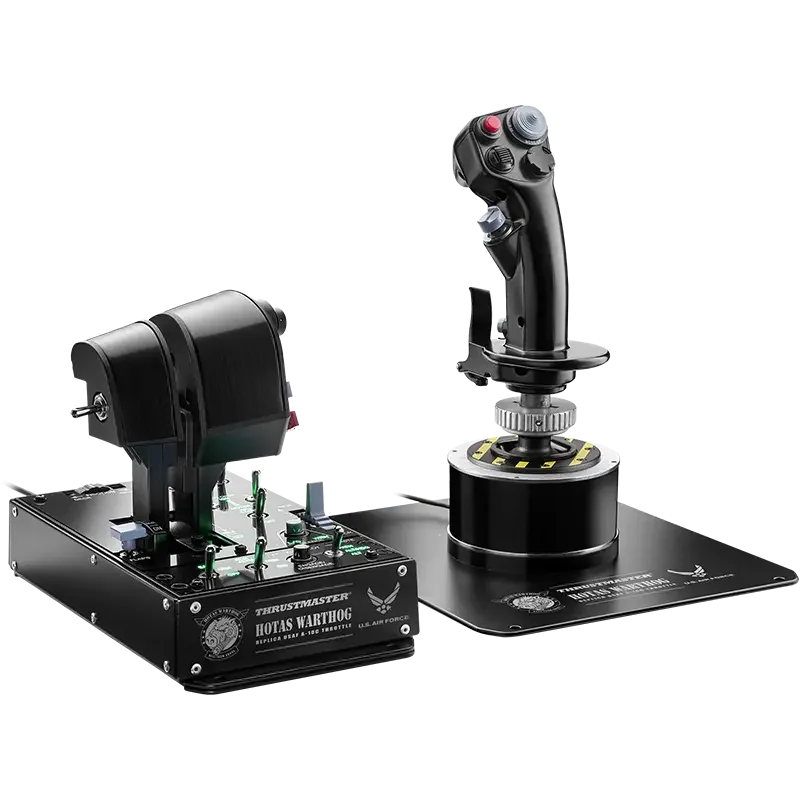
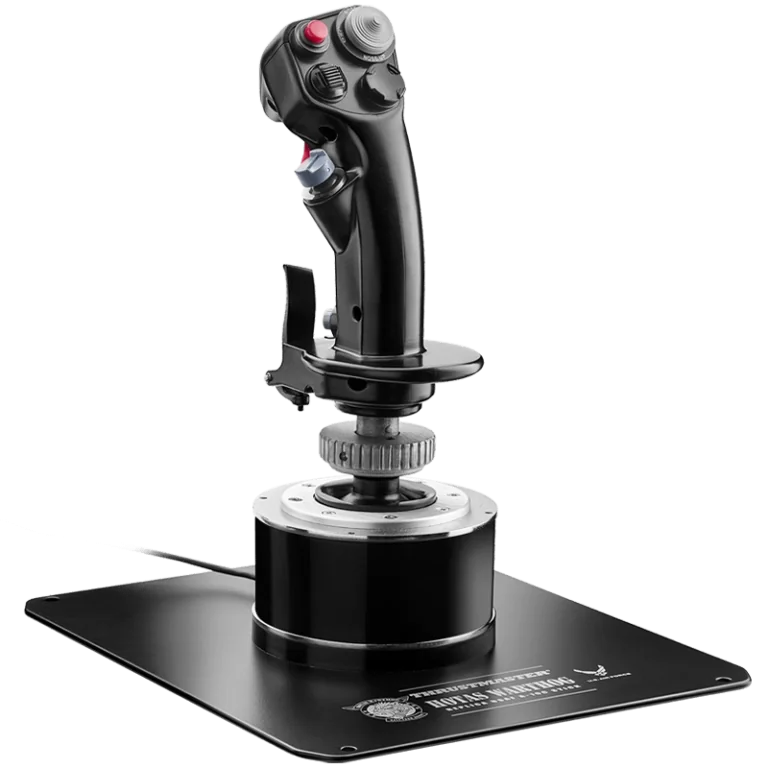
The Thrustmaster HOTAS Warthog joystick is an all-metal copy of the A-10C stick, built with Hall-effect sensors. It works fine as a stick on its own. It is worth understanding before you buy, and worth comparing with Thrustmaster's newer Warthog MKII.
Keep in mind: it does not include a throttle, so budget for one separately if you do not already own one.
What the Thrustmaster HOTAS Warthog joystick actually includes
Thrustmaster's Warthog flight stick weighs over 6 pounds. It is an all-metal copy of the stick in the U.S. Air Force A-10C.
Its H.E.A.R.T. Hall-effect sensors read each axis at 16-bit resolution. It has 19 buttons, three 8-way hats and a metal dual trigger. You also get a 4-way hat with a push button, plus pinkie switches. The metal handle detaches from the base, which matters later if you want to swap grips.
Hall-effect sensors read the stick's position through a magnetic field. Nothing rubs against a track. That is why they keep their precision over years of heavy use. Cheaper sticks with contact-based sensors often don't.
Why the base is the long-term investment
The metal base and its Hall-effect sensors are the part that doesn't wear down. Plastic sticks like the T.16000M or the T.Flight HOTAS X can wear over time. Nineteen buttons plus three hat switches is a generous layout for most combat and general flying. It covers weapons, trim, view control and the radio without a second controller for spare buttons.
Comparing it against the Warthog MKII
If you are shopping today, compare this stick with Thrustmaster's current Warthog MKII. The MKII has a redesigned base. It ships with the A-10C throttle and a Viper stick grip in the same box.
Keep in mind: it replaces the classic stick and throttle as separate purchases with one redesigned base.
It uses the same H.E.A.R.T. Hall-effect sensor family. A newer 6-pin connector supports up to 128 buttons and 8 axes across the whole system.
The classic stick on this page is the older unit sold on its own. The MKII is a newer bundle of base and throttle with the updated connector. Our Warthog HOTAS page covers the MKII in full.
Using it as a standalone stick
The stick plugs into a PC with its own USB cable, with no throttle needed. So it works fine alone if you already own a throttle you like, or plan to add one later. You would usually pair it with a separate set of rudder pedals for yaw. Many simmers take this path. They upgrade one piece of a rig at a time rather than replace a whole HOTAS in one purchase.
What to check on the listing before you buy
The classic stick and the MKII are easy to mix up in search results. Check the title before you order. The classic listing is for the flight stick only, for PC.
The MKII listing names the base, the A-10C throttle and the Viper grip together. If a listing mentions a throttle, read it twice, since the classic throttle is also sold as its own add-on. Our full Warthog system page covers buying both classic halves.
What it doesn't do
The Warthog stick works on PC only, per Thrustmaster's current spec. No version carries an Xbox or PlayStation license. On its own, with no throttle, you also lose separate throttle control for each engine. That is the main reason simmers pair it with a two-lever throttle like the Warthog's own, or buy the newer MKII bundle instead.
How Hall-effect sensors actually change the flying feel
You won't notice the benefit of Hall-effect sensors in your first hour. It shows up over months and years. Most cheaper sticks use sensors that read position by touching a track. That track wears down with use. Over time, that wear causes the dead zones and drift some simmers notice on older, cheap sticks.
Hall-effect sensors read position through a magnetic field instead, so there is no track to wear out. That is the core reason frequent flyers who plan to keep a stick for years lean toward the Warthog line. The T.16000M FCS stick shares similar sensor tech at a lower cost. Thrustmaster's standard-sensor lines, like the T.Flight HOTAS X, don't.
What buying just the stick means for your total setup
If you buy only the Warthog stick, you still need a throttle and a way to steer the rudder. One common pairing is a lighter single-lever throttle from Thrustmaster's own cheaper lines. Another is a throttle from a different brand. For rudder, you can use a rocker on the throttle until you add pedals.
Building a HOTAS piece by piece like this is common. You pick the stick first and the throttle later. It is one reason Thrustmaster still sells the two halves on their own, not only as a bundle.
Desk footprint and mounting
At over 6 pounds, the Warthog stick sits heavier and steadier on a desk than Thrustmaster's plastic sticks. That is on purpose. The weight keeps it planted during firm combat inputs. It needs no special mount for normal desk use. Simmers building a fixed cockpit frame often bolt it to a mounting plate for a more permanent setup.
What the MKII changes about grip modularity
Thrustmaster keeps one grip mount across its Warthog-era hardware. That matters whether you buy the classic stick or the MKII. Both the classic grip and the MKII's Viper grip sit on a mount that also takes other Warthog and Cougar compatible grips. So the grip in the box doesn't have to be the one you keep.
Simmers who focus on one aircraft often plan to move to a grip for that jet later. They keep the same base underneath. That holds for the MKII's new base just as it did for the classic stick, since the mount stayed the same.
How the MKII's connector actually differs
Beyond the bundled throttle and grip, the MKII's main hardware change is its newer 6-pin connector. Thrustmaster says it supports up to 128 buttons and 8 axes across the whole system. The classic stick uses an older connector from before the redesign.
For most simmers, this matters less than the bundle itself. The real question is whether you want a stick alone or the full bundle. The connector comes second to that choice.
Setting up either version
Both the classic stick and the MKII base map through Thrustmaster's free T.A.R.G.E.T. software. It lets you build a named profile for each game rather than rely on factory defaults. Thrustmaster lists three levels of programming in it: Basic, Advanced and Script.
Basic is drag and drop, so you can start there and move up only if you need to. Most PC flight sims see either version as a standard USB joystick. That includes Microsoft Flight Simulator, X-Plane and DCS World.
You can also remap buttons and axes in each game's own control settings, on top of your saved Thrustmaster profile. The classic stick and the MKII share the same sensor family. So moving a profile from one to the other is mostly a matter of relabeling buttons. You won't have to relearn how the axes behave.
Choosing between the classic stick and the MKII
The classic stick is the right buy if you want the older standalone Warthog stick. Maybe you already own a matched classic throttle. Maybe you just like buying each part on its own.
If you are starting fresh with no Warthog gear, the MKII bundle is usually simpler. It saves you from buying the throttle and grip from separate listings. Either way, you keep the Hall-effect precision that makes the Warthog line worth choosing over a plastic stick.
Who this is for
This page is for PC simmers who want Thrustmaster's metal Warthog gear and its Hall-effect precision. That can mean the classic stick or the newer MKII bundle. If you have no strong reason to want the older stick, compare it with the MKII before you commit. If you just want a stick that works without all this thought, a cheaper full HOTAS bundle will get you flying for less. Our Thrustmaster HOTAS guide compares those.
Verdict: is the Thrustmaster HOTAS Warthog joystick worth it?
The Thrustmaster HOTAS Warthog joystick is worth it if you want the original all-metal Warthog stick and its Hall-effect sensors. You should be happy to pair it with a throttle on your own. If you are buying new today, weigh it against the redesigned Warthog MKII. The MKII bundles a base, throttle and grip with a newer connector. Decide which fits your desk and budget, and the way you plan to fly.
FAQ
Can I use the HOTAS Warthog joystick without the throttle?
Yes. The stick connects to your PC over its own USB cable independently of the throttle, so it works as a standalone stick. You would typically pair it with a rudder axis from a separate pedal set or twist-grip yaw, and a different throttle if you do not own the Warthog's.
What's the difference between this classic stick and the Warthog MKII?
The classic HOTAS Warthog stick described here is the original all-metal A-10C replica with 19 buttons, three 8-way hats, and a metal dual trigger. The Warthog MKII is Thrustmaster's redesigned base, which ships with the A-10C throttle and a Viper grip built in, plus a modernized connector.
What sensor technology does the stick use?
Thrustmaster's H.E.A.R.T. Hall Effect AccuRate Technology sensors run at 16-bit resolution per axis, which is a finer input resolution than the potentiometer sensors used in most lower-priced sticks, and one reason the Warthog stick holds precision over years of use.
Does the joystick work on Xbox or PlayStation?
No. Thrustmaster specifies the HOTAS Warthog stick as PC only. There is no Xbox or PlayStation license on this hardware.