
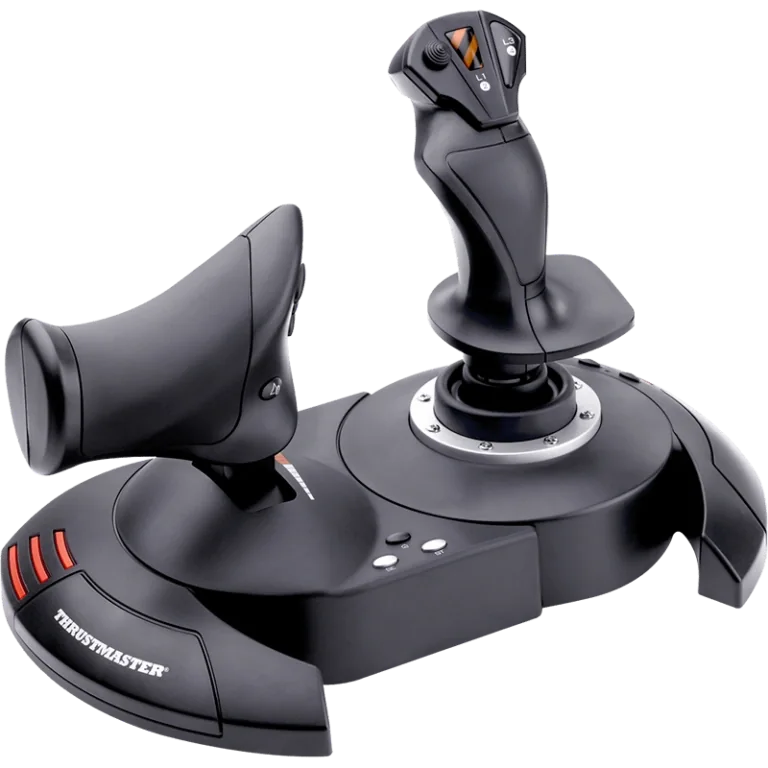
Our verdict:
Best budget PC entry point
Best for PC simmers who want a genuine two-piece HOTAS at the lowest realistic cost.
View at ThrustmasterKeep in mind: it is listed for PC and PS3 only, with no PS4, PS5 or Xbox license.
HOTAS & Joysticks
The short answer
Pick by platform first: the T.Flight HOTAS 4 for PlayStation, the T.Flight HOTAS One for Xbox, and on PC choose between the budget T.Flight HOTAS X, the sensor-upgraded T.16000M FCS HOTAS, or the metal-built Warthog MKII once you know how deep you fly.
Thrustmaster T.Flight HOTAS XView at ThrustmasterRead our analysis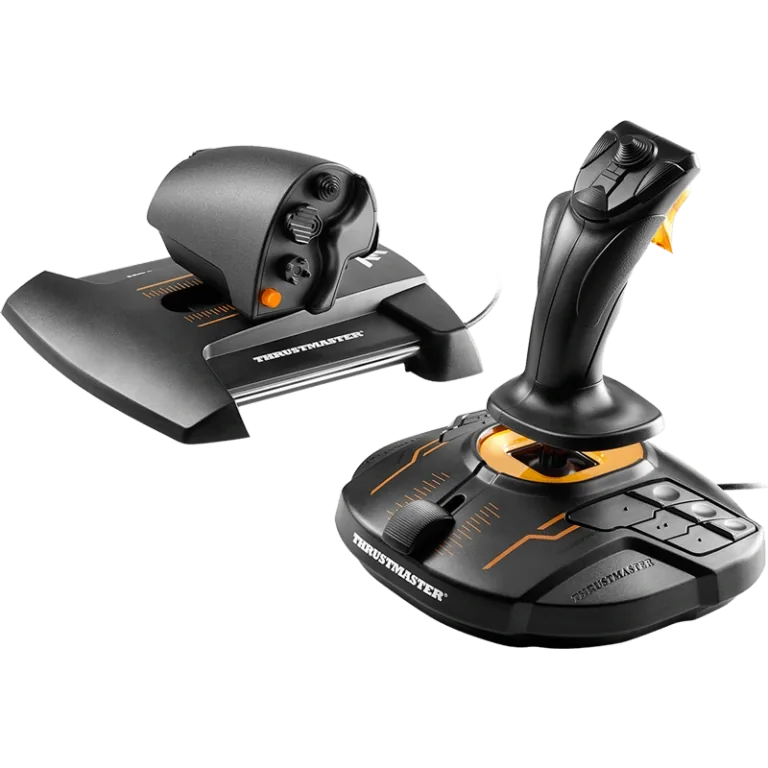 Thrustmaster T.16000M FCS HOTASView at ThrustmasterRead our analysis
 Thrustmaster T.Flight HOTAS 4View at ThrustmasterRead our analysis
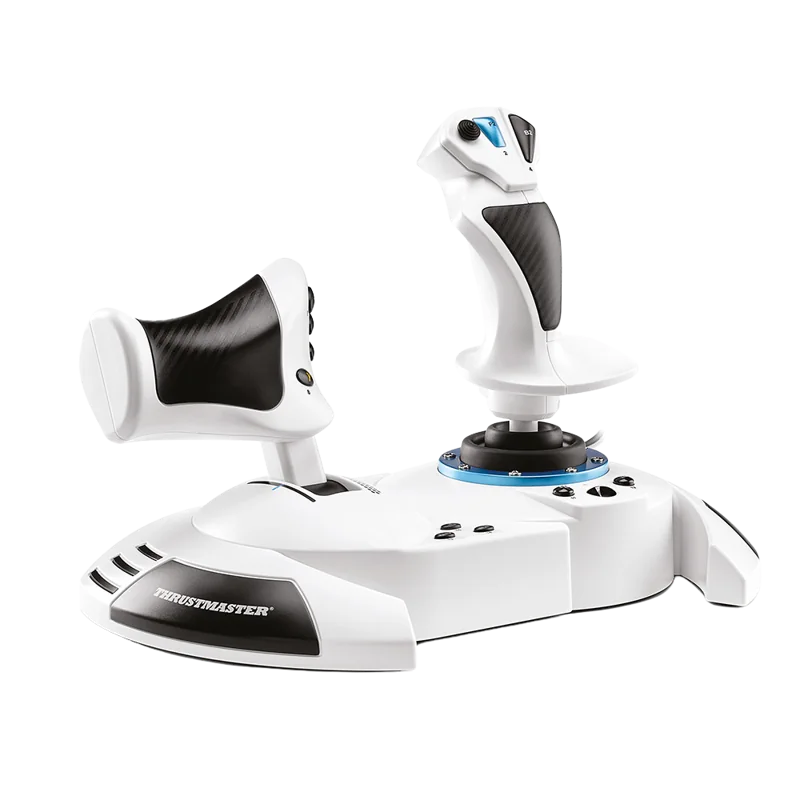 Thrustmaster T.Flight HOTAS One (MSFS Edition)View at ThrustmasterRead our analysis
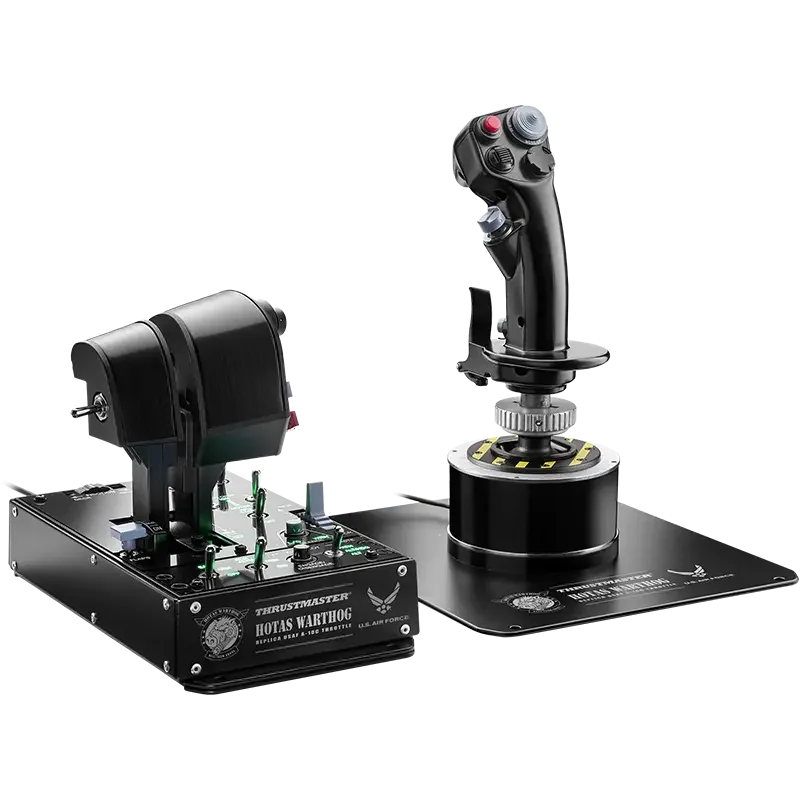 Thrustmaster HOTAS Warthog MKIIView at ThrustmasterRead our analysis
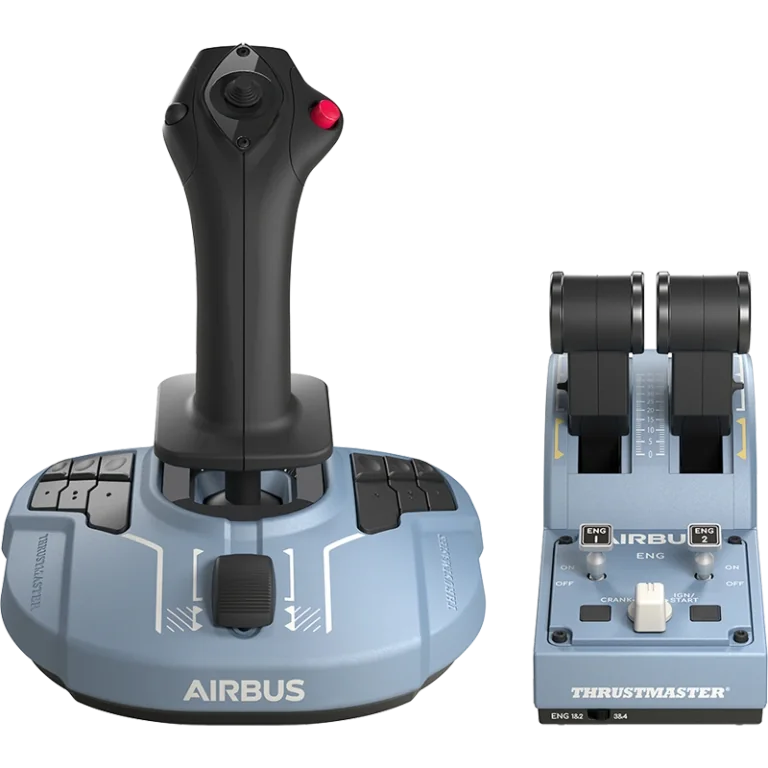 Thrustmaster TCA Officer Pack Airbus EditionView at ThrustmasterRead our analysis
Thrustmaster HOTAS hardware spans several platforms and three price levels. The right one for you depends far more on your platform and how deep your flying goes than on brand loyalty. The six systems below cover the whole current lineup. They run from the budget T.Flight HOTAS X to the flagship Warthog MKII, plus Thrustmaster's console-licensed and airliner options. That way you can pick by what you really fly.
Our verdict:
Best budget PC entry point
Best for PC simmers who want a genuine two-piece HOTAS at the lowest realistic cost.
View at ThrustmasterKeep in mind: it is listed for PC and PS3 only, with no PS4, PS5 or Xbox license.
The T.Flight HOTAS X pairs a joystick with a full-size throttle that detaches. It has 5 axes and 12 programmable buttons, plus a rapid-fire trigger. You can adjust the stick's resistance, and it sits on a weighted base. It uses Thrustmaster's standard sensors rather than the Hall-effect sensors found higher up the range.
It is the cheapest way into a real two-piece HOTAS from Thrustmaster. It suits single-engine flying and lighter combat sims better than dense, switch-heavy modules. If you want to test whether HOTAS flying suits you before spending more, start here. Our T.Flight HOTAS X review covers it in full.
Thrustmaster T.16000M FCS HOTAS
Our verdict:
Best sensor upgrade without going metal
Best for PC simmers who want Hall-effect precision at a lower cost than the Warthog MKII.
View at ThrustmasterKeep in mind: it is PC only, with no console license.
The T.16000M FCS HOTAS bundles the T.16000M FCS stick with the TWCS throttle. The stick has 4 axes, including a twist rudder, and 16 buttons. The throttle adds 14 more buttons, a slider and a small thumb stick.
Both use Thrustmaster's H.E.A.R.T. Hall-effect sensors. That is the same basic tech used in the flagship Warthog MKII.
It is a real precision upgrade over the HOTAS X's standard sensors. The body stays lighter and cheaper than the metal Warthog. Look at this line if sensor precision matters more to you than build material, and you aren't ready to pay a flagship price.
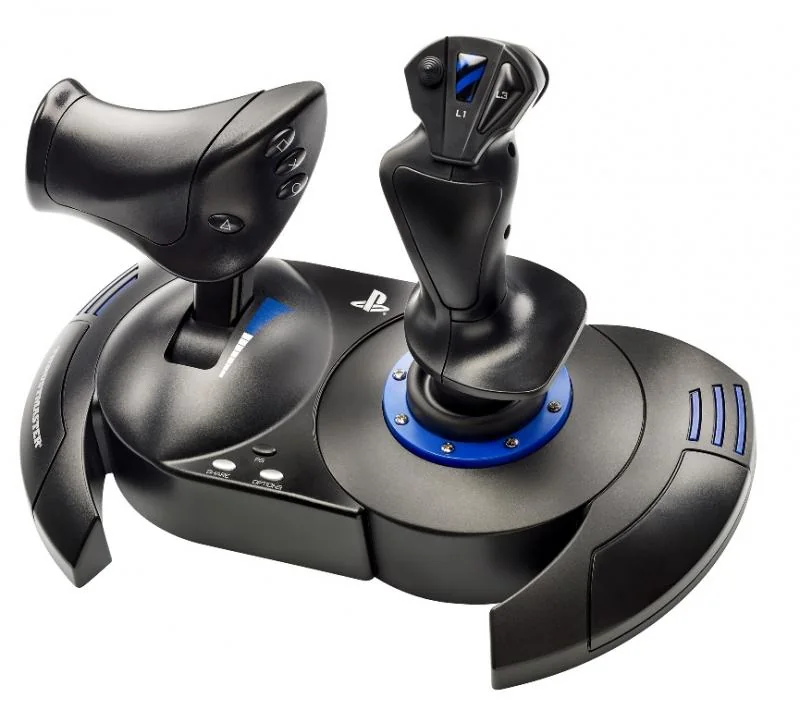
Our verdict:
Best Thrustmaster HOTAS for PlayStation
Best for PlayStation 5 and PlayStation 4 owners who also want the same stick to work on PC.
View at ThrustmasterKeep in mind: it is not licensed for Xbox, so PlayStation and PC are its only supported platforms.
The T.Flight HOTAS 4 is listed for PS5, PS4 and PC. Its throttle detaches, so the two halves can sit apart on a desk or across your lap. You can steer the rudder by twisting the stick or with a tilting lever on the throttle. You can adjust the stick's resistance on its weighted base, much like the entry-level HOTAS X.
If you are building a PlayStation flight-sim setup, this is Thrustmaster's supported option. The PC-only lines above won't pair with a PlayStation, however similar their specs look. Our HOTAS 4 review goes deeper.
Thrustmaster T.Flight HOTAS One (MSFS Edition)
Our verdict:
Best Thrustmaster HOTAS for Xbox
Best for Xbox Series X/S and PC owners who want one licensed stick for both.
View at ThrustmasterKeep in mind: rudder pedals are not included, so pairing with the separate TFRP set costs more if you want them.
The T.Flight HOTAS One is officially licensed for Xbox Series X|S and PC. It has 5 axes, 14 buttons and a rapid-fire trigger. The throttle detaches, so you can run it attached to the stick or apart for a two-hand layout. Thrustmaster's own TFRP pedals pair with it, sold on their own, if you want real rudder control.
If you must have Xbox support, this is the Thrustmaster model built for it right now. Nothing on the PC-only side of the range will connect to an Xbox, however close the spec sheet looks.
Thrustmaster HOTAS Warthog MKII
Our verdict:
Best flagship, PC only
Best for simmers who want a metal-built base with a dual-lever throttle for twin-engine and attack aircraft.
View at ThrustmasterKeep in mind: it costs meaningfully more than the rest of this lineup and has no console license.
The Warthog MKII pairs Thrustmaster's redesigned Warthog base with the A-10C throttle and a Viper stick grip. The Viper grip has 19 buttons, including a 2-stage trigger. The whole system runs on H.E.A.R.T.
Hall-effect sensors, for precision that holds up over years of heavy use. That is the current MKII package: base, A-10C throttle and Viper grip together. It is not the older Warthog stick and throttle sold as separate halves.
It sits at the top of Thrustmaster's HOTAS range for build and price. It works on PC only, with no console license of any kind. Pick it once you are ready to pay a flagship price for a metal build and a two-lever throttle. Our Warthog HOTAS page covers it in full.
Thrustmaster TCA Officer Pack Airbus Edition
Our verdict:
Best Thrustmaster HOTAS for Airbus-style flying
Best for simmers who fly airliners and want Airbus-licensed hardware instead of a fighter-style HOTAS.
View at ThrustmasterKeep in mind: it is a different control philosophy than the rest of this lineup and pairs best with Thrustmaster's own TFRP or TPR pedals.
The TCA Officer Pack pairs an officially licensed Airbus sidestick with a throttle quadrant. The quadrant has 2 axes and 16 buttons and controls, including detents and a thrust reverser. Its detents copy how Airbus pilots set thrust modes, rather than pushing engine power directly like a HOTAS lever. It works with Thrustmaster's TFRP and TPR pedals, sold on their own, for full rudder control. It works on PC only.
If you fly mostly airliners rather than fighters, this airliner line is a closer match to the real cockpit than any fighter-style HOTAS here. Our Thrustmaster Airbus page compares it with the standalone sidestick.
The most common mistake with Thrustmaster HOTAS gear is assuming PC support carries over to a console. It doesn't. A controller must be licensed for Xbox or PlayStation to work on that console. That is a hardware and license rule, not something a driver update fixes later.
The T.Flight HOTAS X, T.16000M FCS HOTAS and Warthog MKII are PC only. The T.Flight HOTAS 4 is licensed for PlayStation. Xbox gets its own model, the T.Flight HOTAS One. Filtering by platform first cuts this lineup of six down to one or two real options, before you even look at buttons or build.
The number of buttons and axes is the quickest way to gauge how much a HOTAS can handle before you outgrow it. The T.Flight HOTAS X has 12 buttons and 5 axes, enough for small-plane flying and lighter combat sims. The T.Flight HOTAS One steps up a little to 14 buttons.
The Warthog MKII's Viper grip alone has 19 buttons. That is built for dense combat modules, where one fighter jet can use dozens of cockpit functions. If your flying is heading toward combat sims with deep systems, the entry-level lines will start to feel tight sooner than you expect.
Beyond buttons, sensor type separates the lineup more than almost anything else. The T.Flight HOTAS X, HOTAS 4 and HOTAS One use Thrustmaster's standard sensors. Those usually rely on potentiometers, which read stick position by touching a track. That contact wears over time. It is why older, heavily used budget sticks sometimes develop dead zones or loose centering.
The T.16000M FCS stick and the Warthog MKII base use H.E.A.R.T. Hall-effect sensors instead. They read position through a magnetic field, with nothing touching. That avoids the wear entirely.
This is the most common point of confusion in Thrustmaster's catalog. PC support never means console support, and Thrustmaster's own lines split cleanly on it. The T.Flight HOTAS X, T.16000M FCS HOTAS and Warthog MKII are PC only, with no Xbox or PlayStation license in any current version.
The T.Flight HOTAS 4 carries a PlayStation license, plus PC, and nothing else. Its Xbox sibling, the T.Flight HOTAS One, carries an Xbox license, plus PC, and nothing else. No model in Thrustmaster's current range is licensed for both Xbox and PlayStation at once.
Build material tracks closely with price and how long the gear should last. The T.Flight HOTAS X and HOTAS 4 are plastic. They are light enough to move between a desk and a couch with little effort. The T.16000M FCS stick is plastic as well. It keeps the weight down while stepping up the sensors.
The Warthog MKII stands apart. It pairs a metal base with the A-10C throttle and a Viper grip. It is built for simmers who fly so often that a plastic base would flex or wear under firm, repeated inputs.
Not every Thrustmaster throttle is built the same way. The T.Flight HOTAS X, HOTAS 4 and HOTAS One all use a single-lever throttle that detaches. That is fine for single-engine planes and most general combat flying.
The Warthog MKII's A-10C throttle is a different kind of hardware. It is built for twin-engine planes, where each engine needs its own throttle. Some warbirds, some airliners and multi-engine small planes fall in that group. If you fly them often, the MKII's throttle does something the rest of the lineup can't.
Thrustmaster's TCA line, short for Thrustmaster Civil Aviation, is worth knowing even though it works differently from the rest of this page. The TCA Officer Pack represents it here. It includes licensed Airbus sidestick hardware built to copy how a real airliner sets thrust modes. If you fly mostly airliners, this line is a closer match than any fighter HOTAS. Airliner pilots use a sidestick or a yoke, not a center stick built for combat.
Thrustmaster's sticks and throttles each connect to your PC with their own USB cable. So you can mix parts within the PC-only side of the range. You might run a T.16000M FCS stick with a Warthog throttle for two-lever control.
Or you might run a Warthog stick with a lighter throttle if desk space is tight. The console units, the HOTAS 4 and HOTAS One, are usually used as their bundled pairs. Their console licensing is tied to that exact hardware.
Every model in this roundup connects over wired USB, not wireless. The Warthog MKII uses detachable cables, which makes a swap easy if one ever frays from a cockpit mount pulling on it. The console units connect to the console with a wired USB cable. It reaches most couch or chair setups. A USB extension is a common add-on for simmers who sit further from their console or PC.
None of these six systems includes rudder pedals, so plan for them on their own. The T.Flight HOTAS X, T.16000M FCS HOTAS and HOTAS 4 all handle yaw with a stick twist or a throttle lever by default. Thrustmaster's TFRP pedals add a real pedal set to any of them, over a separate USB link.
The HOTAS One and the TCA Officer Pack both name the TFRP directly. The Officer Pack also pairs with Thrustmaster's pendulum TPR pedals, for a smoother, hanging feel closer to a real airliner's rudder bar. The Warthog MKII works with either pedal set too. Thrustmaster's current pedals connect as their own USB devices and don't need a matched base. Our rudder pedals roundup compares them.
Simmers rarely stop at their first Thrustmaster HOTAS once they know what they're missing. One common path starts with the T.Flight HOTAS X. Owners then add TFRP pedals once the twist rudder starts to feel imprecise in combat.
Another path starts with the T.16000M FCS HOTAS for its Hall-effect sensors. Later, owners add a Warthog throttle for two-lever control and keep the original stick. The two connect with separate USB cables, so neither has to be replaced. Airliner fans who start on a fighter HOTAS sometimes move to the TCA Officer Pack. They find that a center stick doesn't copy how Airbus planes are flown.
If you are choosing your first Thrustmaster HOTAS, rule options out by platform first. On PC, consider the T.Flight HOTAS X, the T.16000M FCS HOTAS or the Warthog MKII. On PlayStation, your only pick is the T.Flight HOTAS 4. On Xbox, it is the T.Flight HOTAS One.
From there, PC buyers should weigh sensor life and metal build against price. The HOTAS X costs the least. The T.16000M FCS HOTAS gives you better sensors in a similar body.
The Warthog MKII gives you a metal build and a two-lever throttle. If you mostly fly airliners, look past fighter HOTAS gear and toward the TCA Officer Pack. A center stick copies fighter cockpits, not the yokes and sidesticks airliner pilots use.
On PC, Thrustmaster's free T.A.R.G.E.T. software handles button mapping and per-game profiles across most of this range. Past basic remapping, it supports macros, where one button press sets off a chain of actions. It also has a scripting layer that can treat a stick, throttle and pedals as one combined device.
Most casual buyers never touch the scripting side. It is there for anyone building a complex cockpit with more physical controls than buttons. On a console, you map controls in each game's own menu instead.
If you fly in a VR headset, any of these six systems can work. Button layout matters more, though, once you can't glance down to find a switch. The T.Flight HOTAS X, with 12 buttons, is among the fastest to learn by feel.
The Warthog MKII's Viper grip, with 19 buttons and a 2-stage trigger, takes longer to learn. It rewards that time with more functions within reach of the stick. Whichever you choose, practice the layout outside VR first.
This guide is for anyone working out which Thrustmaster HOTAS fits their platform and how deep they fly. It helps before you compare single models line by line. If you are on PC and want the flagship, our Warthog joystick and throttle guide goes deeper. If you are on a console, our HOTAS 4 and HOTAS One pages cover what is licensed for your hardware.
Match your platform first when you pick a Thrustmaster HOTAS. PlayStation owners want the T.Flight HOTAS 4, and Xbox owners want the T.Flight HOTAS One. PC-only buyers can choose the T.Flight HOTAS X for the lowest cost, or the T.16000M FCS HOTAS for Hall-effect sensors in a similar body. The Warthog MKII fits once a metal build and a two-lever throttle justify a flagship price. Airliner fans should look at the TCA Officer Pack instead of any of the fighter sticks above.
Match your platform first. On PC with a tight budget, the T.Flight HOTAS X or T.16000M FCS HOTAS both work. On PS4 or PS5, the T.Flight HOTAS 4 is the officially licensed choice. On Xbox Series X|S, the T.Flight HOTAS One is Thrustmaster's licensed option. Only step up to the Warthog MKII once you know you want metal construction and dual-lever throttle control.
Within the PC-only lineup, mostly yes. Thrustmaster's joystick and throttle units connect over independent USB cables, so a T.16000M FCS stick can run with a Warthog throttle, for example. Console-licensed units like the HOTAS 4 and HOTAS One are generally sold and used as their bundled pairs.
All of Thrustmaster's PC-compatible HOTAS units work with any PC flight sim that accepts standard USB HOTAS input and Thrustmaster's T.A.R.G.E.T. mapping software, which covers MSFS, X-Plane and DCS World. Console-only titles depend on that platform's own supported controller list.
The T.16000M FCS stick uses the same H.E.A.R.T. Hall-effect sensor technology as the flagship Warthog MKII, which gives it finer input precision than the T.Flight HOTAS X's standard sensors, while still using a lighter, non-metal body and costing less than the Warthog.