T Flight HOTAS X: Thrustmaster's Entry-Level Stick and Throttle in 2026
The short answer
Best for someone who wants a real two-piece HOTAS on PC without stepping up to premium, metal-built hardware. Skip it if you need Xbox compatibility or PlayStation 5 support; Thrustmaster lists the HOTAS X for PC and PS3 only.
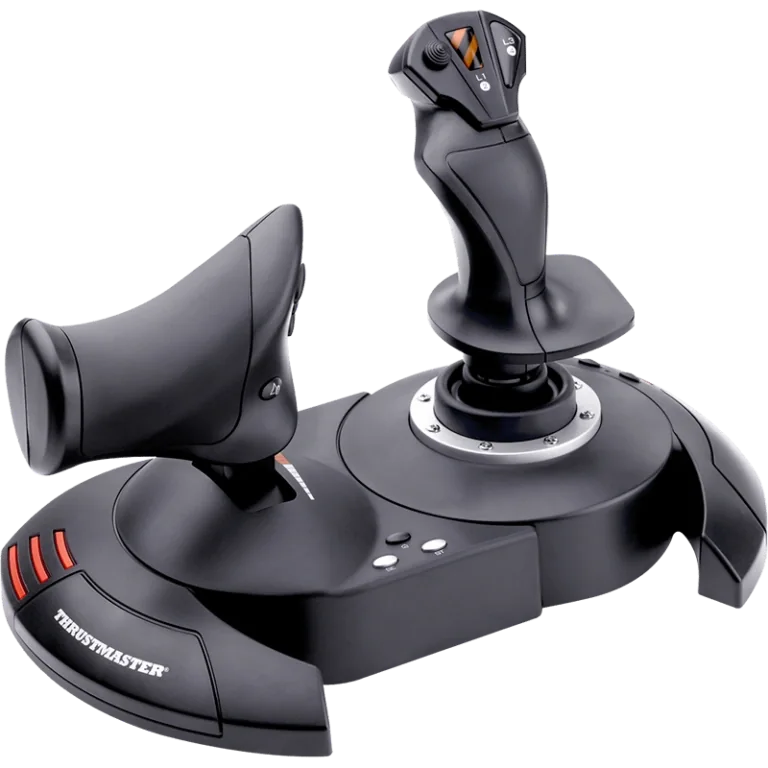
The Thrustmaster T Flight HOTAS X pairs a joystick and a detachable throttle for PC and PlayStation 3. It is built as a first step into two-handed HOTAS flying, not as a premium combat rig. Knowing that up front saves you from expecting Warthog-level hardware at a fraction of the size and weight.
Keep in mind: its console listing stops at PlayStation 3, so it will not pair with PS4, PS5 or Xbox.
What the T Flight HOTAS X actually gets you
Thrustmaster's listing describes the HOTAS X as one joystick and one throttle that you can run together or apart. The throttle detaches fully. You can set it on the desk next to your keyboard, rest it in your lap or mount it on its own later if you build a cockpit frame. A twist-grip rudder is built into the stick. Most entry-level HOTAS sets use this in place of real pedals.
The whole system is plastic, not metal. That makes it much lighter and smaller than a metal system like the HOTAS Warthog. It matters if desk space or moving the setup around is a real concern for you.
Where it sits against Thrustmaster's other sticks
Thrustmaster's T.16000M FCS series uses H.E.A.R.T Hall-effect sensors, the same tech as the higher-end Warthog line. The HOTAS X comes from before that generation and uses Thrustmaster's standard sensors. In practice, its precision and long-term durability sit a step below the T.16000M and well below the Warthog. Its cost and desk footprint also sit well below both. If budget is your main limit and you want a real two-piece stick and throttle, the HOTAS X fills that gap.
The throttle is a single lever. It doesn't have the two separate levers of Thrustmaster's Warthog throttle. Twin-engine planes benefit from two levers, because each engine gets its own control. A single-engine plane doesn't need that at all, and that covers most of what new simmers fly first.
The step-up option: T.16000M FCS HOTAS
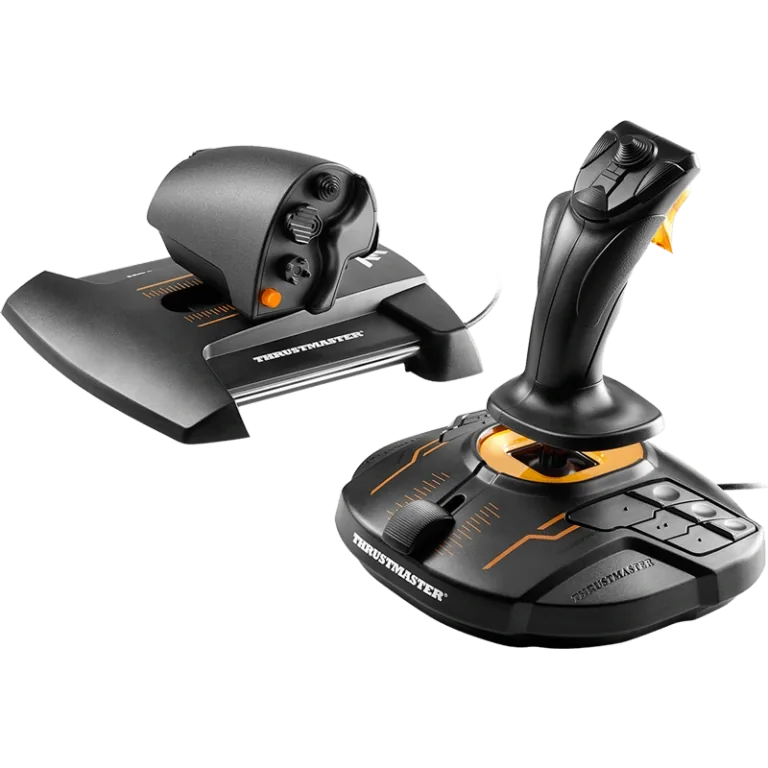
The HOTAS X's standard sensors and single lever may stop being enough. Then Thrustmaster's own T.16000M FCS HOTAS is the natural next step on PC. It pairs the T.16000M stick with the TWCS throttle. The stick uses Hall-effect sensors, and you can swap its parts for left- or right-hand use. The throttle adds a slider and a small thumb stick on top of its buttons.
Keep in mind: it stays PC-only, so it does not solve a console-compatibility need.
Both work on PC only, over USB. So moving up to this pair doesn't change your platform, only your precision and control count. Our flight stick for PC roundup compares it with other PC sticks.
The platform limitation to check first
Thrustmaster's spec sheet lists the T Flight HOTAS X for PC and PlayStation 3. That is it. There is no PS4, no PS5 and no Xbox license of any kind.
This trips people up. Thrustmaster makes several HOTAS models, and it is easy to assume they all work on every platform. They don't.
For a PlayStation 4 or PlayStation 5 rig, Thrustmaster's T.Flight HOTAS 4 is the model built for that hardware. Our HOTAS 4 review covers it. On an Xbox Series X|S, you need a controller built for that console. The T.Flight HOTAS One is Thrustmaster's answer there.
Who actually needs a dedicated rudder axis
Most single-stick HOTAS sets give you yaw through a twist of the stick. You turn the whole grip left or right to steer the rudder. It is no substitute for real pedals if you fly taildraggers, warbirds or anything where crosswind rudder work matters on landing. For casual flying and most small trainers, a twist rudder is a fair place to start. You can add pedals later without replacing the stick.
How it holds up for different sim genres
The HOTAS X covers the basics for single-engine flying and light airliners in Microsoft Flight Simulator or X-Plane. That means throttle, flaps and gear, plus a handful of view and radio controls. Combat sims with deep weapons and systems work tend to outgrow a budget stick's buttons fast. DCS World modules are an example. A single fighter jet module can use dozens of separate functions.
If you lean toward combat flying, read up on a stick with more buttons before you commit. The T.16000M FCS HOTAS and the Warthog are two options. The HOTAS X works best as a starter unit for casual flying, not a long-term combat setup.
Mounting and desk space
The HOTAS X is built to sit on a standard desk. It needs no mount or cockpit frame. The throttle detaches completely, so you can place it to one side or in your lap. You can also clamp it on its own if you later build a fixed cockpit. Thrustmaster uses the same detachable throttle across its whole T.Flight line.
Setting up and mapping buttons
Like the rest of Thrustmaster's range, the HOTAS X works with Thrustmaster's drivers and mapping tools. Most PC flight sims see a connected HOTAS X as a standard USB joystick and throttle on their own. That includes Microsoft Flight Simulator, X-Plane and DCS World. You can remap buttons and axes in each game's control settings too.
What the throttle side changes about your flying
The single-lever throttle is worth a look on its own. Since it detaches fully, you can run it right next to the stick's base for a compact desk footprint. Or you can move it several inches away for a more natural hand position. That is closer to how a real single-engine cockpit spaces its controls.
If you come from a keyboard-only setup, the throttle alone is usually the biggest jump in comfort. On a keyboard, throttle tends to be an all-or-nothing toggle. Here it is a smooth analog input.
When the T Flight HOTAS X stops being enough
A few clear signs show that this stick has reached its limit for you. Maybe you remap the same few buttons for every plane because you keep running out of controls. That is a button-count problem, and the T.16000M FCS HOTAS solves it with more buttons.
Maybe the stick's centering feels less steady after months of daily use. That is sensor wear, and the Hall-effect sensors in the T.16000M and Warthog lines address it, since they read position without contact. Or maybe you now fly twin-engine planes and want a throttle for each engine. No software fixes that. Only a two-lever throttle, like the Warthog's, adds it.
A reasonable upgrade path
The HOTAS X sits at the entry level of Thrustmaster's range. Many simmers buy it first and decide later whether they need more. You might outgrow the single throttle, often because a combat module needs more switches than the stick has. Then the T.16000M FCS HOTAS is the next step up in sensor quality. The HOTAS Warthog is the step up in both sensors and metal build, with a two-lever throttle.
None of those steps changes your console situation, since all three are PC-focused. The platform choice is the one thing the HOTAS X doesn't let you change later.
Who the T Flight HOTAS X is for
The HOTAS X is built for PC simmers who want a real two-piece stick and throttle without paying for metal hardware. It suits pilots who mostly fly single-engine planes, not combat modules with dense button layouts. It is the wrong model if you need Xbox, PS4 or PS5 support. It is also wrong if you already know you want two throttle levers for twin-engine flying. The HOTAS X won't grow into either need later.
Verdict: is the T Flight HOTAS X worth buying?
The T Flight HOTAS X is worth buying if you want a real two-piece HOTAS on PC without stepping up to premium hardware. Skip it if you need Xbox or PlayStation 5 support, since Thrustmaster lists the HOTAS X for PC and PS3 only. Consider the T.16000M FCS HOTAS instead if Hall-effect precision or more buttons matter more to you than a low cost and a small footprint.
FAQ
Does the T.Flight HOTAS X work on Xbox?
No. Thrustmaster lists the HOTAS X for PC and PlayStation 3 only. There is no Xbox license on this model, so it will not pair with an Xbox Series X|S. For Xbox, look at a model built for that console, such as Thrustmaster's own T.Flight HOTAS One.
Will it work on PS4 or PS5?
Thrustmaster's listing for the HOTAS X names PC and PlayStation 3 as the supported platforms. It does not carry a PS4 or PS5 license, so if you are on newer PlayStation hardware, the T.Flight HOTAS 4 is the Thrustmaster model actually built for PS4 and PS5.
How does it compare to the T.16000M FCS HOTAS?
The T.16000M FCS HOTAS pairs a Hall-effect stick with the TWCS throttle, PC only, and adds Hall-effect precision that the HOTAS X's simpler sensor package does not carry. If you want that extra precision and are staying on PC, the T.16000M FCS HOTAS is the step up.
Can the throttle be used separately from the stick?
Yes. Thrustmaster built the HOTAS X throttle to be fully detachable, so you can position it away from the joystick on a desk or in your lap rather than locked to the stick's base.