The Thrustmaster T.16000M FCS HOTAS is the best starting flight stick for PC because it pairs Hall-effect sensors with a separate throttle at a lower entry point, and the Thrustmaster HOTAS Warthog MKII is the pick once you want a metal-built flagship.
A flight stick for PC comes down to three questions. Do you want a joystick alone or a matched stick-and-throttle HOTAS? How many buttons do the sims you fly really need?
And how much heavy, repeated use will the hardware see? The six systems below cover a budget-to-mid pick, an entry-level full HOTAS and a metal flagship. They also include three picks from other brands at different price levels.
#1. Thrustmaster T.16000M FCS HOTAS: best budget-to-mid flight stick for PC
Keep in mind: it is PC only, with no console license.
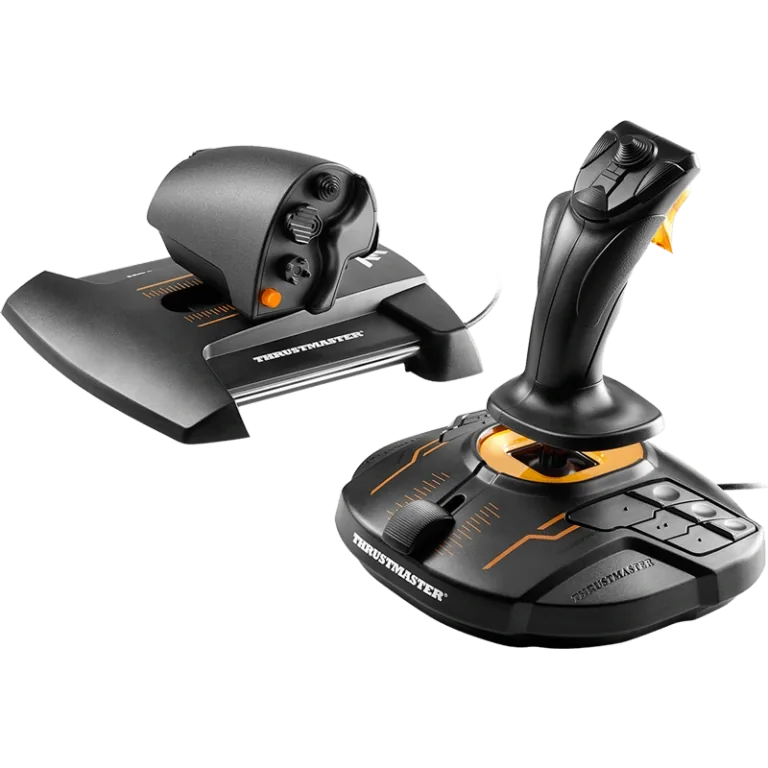
The T.16000M FCS HOTAS pairs the T.16000M FCS stick with the TWCS throttle. The stick has 4 axes, including a twist rudder that locks, and 16 buttons. The throttle adds 14 more buttons, a slider and a small thumb stick. Both use Thrustmaster's Hall-effect sensors, the same family found in the pricier Warthog MKII. So a lower cost here doesn't mean less precise input.
It runs over USB, and basic input needs no drivers. Thrustmaster's free T.A.R.G.E.T. software handles mapping and profiles for the stick and throttle together. This is the pick if you want a real two-piece HOTAS as your first PC purchase, without paying for a metal build yet.
#2. Thrustmaster T.Flight HOTAS X: best entry-level complete HOTAS
Keep in mind: it is listed for PC and PS3, with no PS4, PS5 or Xbox license.
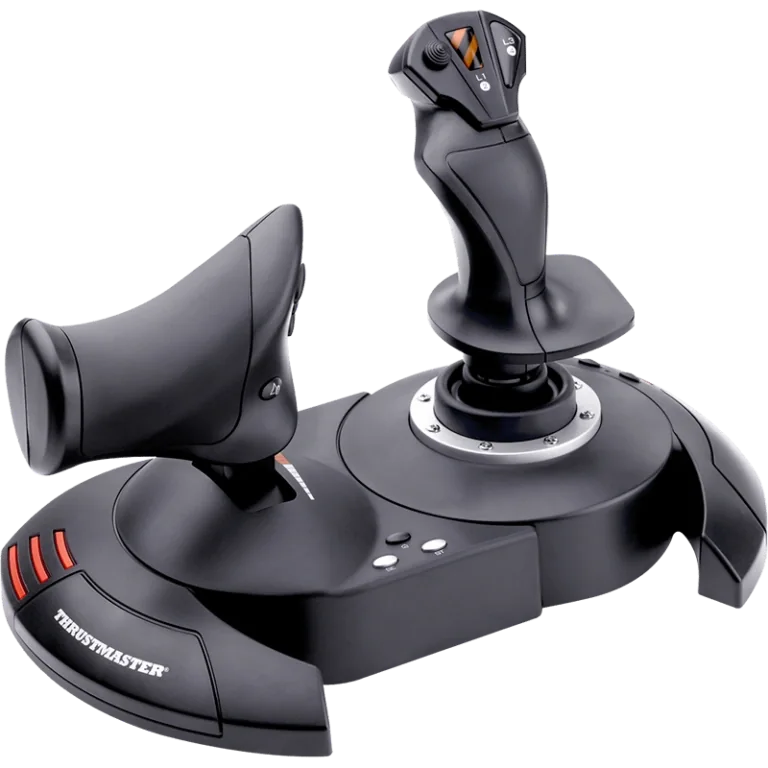
The T.Flight HOTAS X is a complete system out of the box. It has a full-size throttle that detaches from the stick, 5 axes, 12 programmable buttons and a rapid-fire trigger. You can adjust the stick's resistance. The build is plastic, not metal.
It is a step up from a bare stick if you want throttle-and-stick control without buying pieces on their own. It is a step below the T.16000M FCS HOTAS on sensor type. If your budget is tight and you mainly fly casually, it is a fair place to start. Our T.Flight HOTAS X review covers it in full.
#3. Thrustmaster HOTAS Warthog MKII: best premium flight stick for PC
Keep in mind: it costs meaningfully more than the rest of this roundup and is built for a permanent setup.
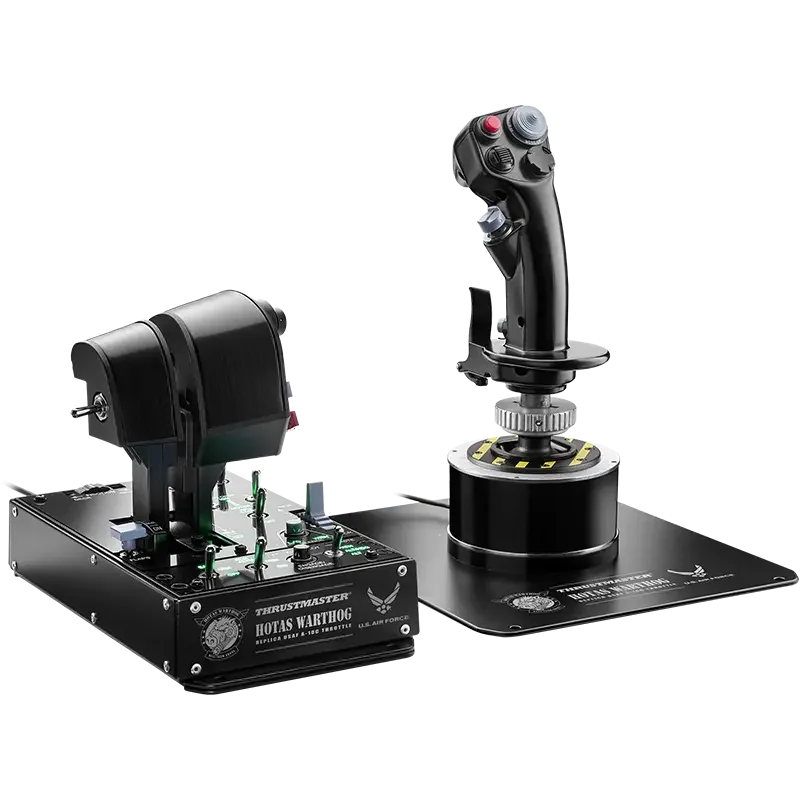
The HOTAS Warthog MKII redesigns Thrustmaster's flagship base. It pairs that base with the A-10C throttle and a Viper stick grip. The Viper grip has 19 buttons, including a 2-stage trigger. The whole system runs on Thrustmaster's H.E.A.R.T.
Hall-effect sensors. That is the current MKII package: base, A-10C throttle and Viper grip together. It is not the older Warthog stick and throttle sold as separate halves.
It works on PC only, with no console license of any kind. Pick it once you know you want the sturdiest build and are ready to pay a flagship price. It isn't a first stick for someone still deciding whether HOTAS flying suits them. Our Warthog HOTAS page goes deeper.
#4. Logitech G X56 HOTAS: best alternative-brand premium flight stick
Keep in mind: it is a large twin-throttle unit that needs more desk space than a single-lever system.
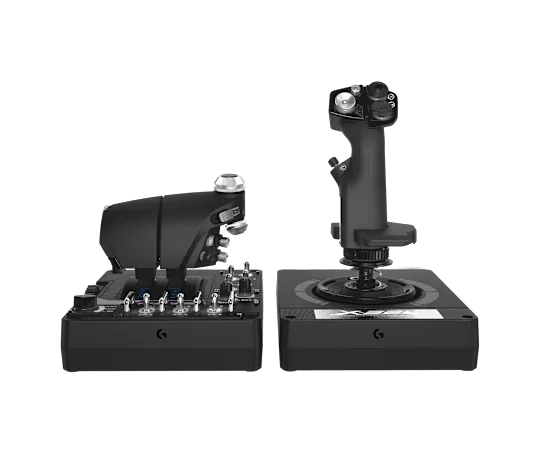
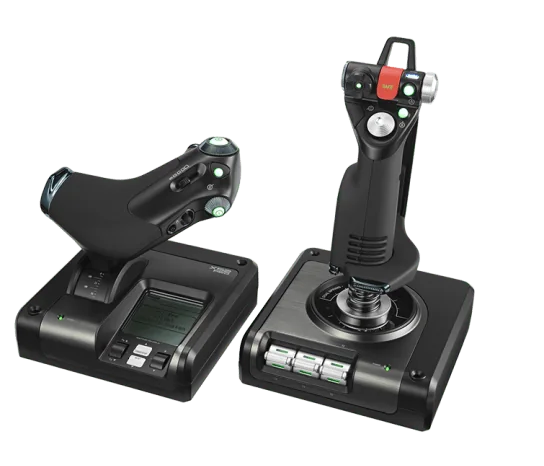
The Logitech G X56 uses 16-bit Hall-effect sensors on pitch and roll. Four swappable springs let you set the stick force you like. The throttle has two levers with a friction dial and a lock. The base adds mini analog sticks and RGB lights. It is a real alternative to Thrustmaster's high-end range for simmers who prefer Logitech's gear.
The two-lever throttle aims at simmers who want separate engine control without paying the Warthog MKII's price. If button layout and software matter more to you than brand, compare this one directly with the Warthog MKII.
#5. Logitech G Saitek X52 Pro: best alternative-brand mid-range flight stick
Keep in mind: its sensors are non-contact only on the stick's X and Y axes, not the full Hall-effect family found on the pricier picks here.
The X52 Pro's throttle has a multi-function LCD screen and lit buttons. You can adjust its resistance, and it has idle and afterburner detents. The stick uses non-contact sensors on its X and Y axes. The handle adjusts to 5 positions for different hand sizes. It runs on Windows PC.
It sits between the T.16000M FCS HOTAS and the flagships on both price and build. None of the other picks here has a screen on the throttle. If a display you can read at a glance appeals to you, this is the stick to look at. Our X56 HOTAS review compares the two Logitech sets.
#6. HORI HOTAS Flight Control System: best flight stick with a built-in control panel
Keep in mind: it is a newer entry from a brand with a shorter flight-sim track record than Thrustmaster or Logitech.
HORI's HOTAS Flight Control System pairs a stick that has Hall-effect sensors and a dual trigger with a twin throttle. The two throttle levers can lock together or split apart. A separate control panel adds metal toggle switches for cockpit functions. A steel desk mount comes in the box, rather than being sold on its own. It runs on Windows PC.
The included desk mount is the standout here. Every other system in this roundup needs a mount bought separately, if your desk doesn't already suit it. If you want fewer purchases to get a steady setup, weigh that next to the specs above.
Factors to consider when choosing a flight stick for PC
Standalone stick vs full HOTAS
A standalone joystick gives you pitch, roll, a twist-rudder axis and a set of buttons, with no separate throttle. That is enough if you bind throttle to a slider or a twist axis. It is also enough if your sim doesn't demand quick throttle changes.
A full HOTAS pairs a stick with a real throttle unit. Most simmers prefer one once they fly combat moves or multi-engine planes. A real lever is faster to reach mid-flight than a keyboard key or a spare stick axis.
Sensor type and precision
Sensor tech matters more than price level suggests. Thrustmaster's H.E.A.R.T. Hall-effect sensors appear in both the budget T.16000M FCS HOTAS and the premium Warthog MKII. So a cheaper stick isn't automatically less accurate. It usually has a lighter build and fewer buttons, not worse sensors.
If precision is your main concern, check whether a stick uses Hall-effect sensors. They read position without contact and usually last longer. Standard sensors can wear and start to drift after heavy use.
Build material and durability
Build material tracks closely with price and how long the stick should last. The T.Flight HOTAS X is plastic and light enough to move between a desk and a couch. The Warthog MKII stands apart in this roundup. Its metal base and grip are built for simmers who fly so often that a plastic base would flex or wear over time.
What to check regardless of brand
Whatever stick you look at, check four things before you buy. First, PC support is standard, but console support is not. Don't assume a stick works on Xbox or PlayStation unless the listing says so.
Second, check the axis count against what your sim needs. Third, check the button count against how many functions you want without opening a menu mid-flight. Fourth, check whether the throttle is included or sold on its own. That changes both the total cost and the setup steps.
The premium tier beyond this roundup: VKB and other boutique brands
Above the mainstream range covered here sits a tier of small specialist makers. VKB is the name that comes up most in flight-sim communities. VKB sells bases, grips and throttles as separate parts, not one matched box.
That appeals to simmers who already know they want to mix and match. It isn't a fit for a first HOTAS the way the six systems above are. So we cover it on its own in our VKB HOTAS guide rather than as a pick here.
Understanding what mapping software actually does
Thrustmaster's free T.A.R.G.E.T. software turns raw hardware into a usable setup for each game. It handles profile switching, with a different button layout saved for each game. It also has a scripting layer for advanced users. You can build macros and even treat a stick, throttle and pedals as one controller.
Casual buyers may never touch the scripting side, but it is there if you go deep into one sim. Logitech and HORI ship similar software with their own sticks. It covers the same basic ground: profiles, dead zones and button remapping.
Mounting and desk setup
A stick that shifts on your desk in hard turns undoes even the best sensor. A clamp-on desk mount keeps the stick and throttle fixed through a session. A chair arm does the same if desk space is tight. This matters more the more buttons and axes you use, since a sliding stick is harder to keep accurate on fine inputs. Our HOTAS chair mount roundup covers mount types in more depth.
Twin-throttle vs single-lever throttle designs
Not every throttle here works the same way. The T.16000M FCS HOTAS, T.Flight HOTAS X and X52 Pro all use a single-lever throttle that detaches. That is fine for single-engine planes and most general combat flying.
The Warthog MKII's A-10C throttle and the X56's twin throttle are a different kind of hardware. They have separate levers for twin-engine planes, where each engine needs its own throttle. If twin-engine flying is a real part of your routine, those two picks do something the rest of the lineup can't.
VR use
If you fly in a VR headset, the stick and throttle layout matters more, since you can't glance down to find a switch. Any of the six systems above can work in VR once you learn the layout by feel. A dense control set like the Warthog MKII's Viper grip or the X56's twin throttle takes longer to learn than the simple 12-button T.Flight HOTAS X. Whichever stick you choose, practice the layout outside VR first. Then your hand finds the controls once the headset goes on.
Console licensing, restated plainly
This is the most common point of confusion when shopping for a flight stick for PC. PC support never means console support. Every system in this roundup is built and sold for PC, and none carries an Xbox or PlayStation license. If you need a console stick, look at hardware sold for that platform. Our Xbox flight stick and PS5 HOTAS roundups cover those.
A worked comparison across the lineup
Picture three PC simmers with different goals. The first wants the lowest cost for a real two-piece HOTAS and is fine with standard sensors. The T.Flight HOTAS X fits that case. It is plastic and uses Thrustmaster's standard sensors rather than Hall-effect ones.
The second wants Hall-effect precision without going metal. The T.16000M FCS HOTAS fits, at a much lower price than the Warthog MKII, with the same sensor family. The third flies twin-engine or attack planes often enough to want a metal build and a two-lever throttle. That is the Warthog MKII's case to make.
The Logitech X56 fits too, if separate throttle levers matter more to you than metal. None of these three is a wrong choice. They serve different habits and budgets.
Who this guide is for
This guide is for someone comparing PC flight sticks before buying a first one. It also suits someone upgrading from an entry-level stick to one built for heavier use. If you already want a matched HOTAS and need to compare models further, our HOTAS 4 and Elite Dangerous HOTAS pages go deeper.
Verdict: which flight stick for PC to buy
Start with the Thrustmaster T.16000M FCS HOTAS for Hall-effect precision and a separate throttle at a lower price. Pick the T.Flight HOTAS X for the simplest complete system. Step up to the HOTAS Warthog MKII once you want a metal build and a two-lever throttle and are ready to pay a flagship price. The Logitech G X56 and X52 Pro are solid picks if you prefer Logitech's software. The HORI system is worth a look for its included desk mount and control panel.
Whichever flight stick for PC you choose, it doesn't have to be final. Every system here connects over standard USB. Adding a second stick later, or swapping in a different throttle, is a normal part of this hobby. Many keen simmers end up owning more than one stick, each for a different kind of flying.
FAQ
Do I need a full HOTAS, or is a standalone joystick enough for PC?
A standalone joystick works if you plan to bind throttle to a twist axis or slider on the stick itself. Most PC flight sims are easier to fly with a dedicated throttle lever, which is why every flight stick for PC in this roundup is sold as a matched stick-and-throttle pair.
Does a more expensive flight stick for PC actually fly better?
Not necessarily on precision. The T.16000M FCS HOTAS uses the same Hall-effect sensor family as the flagship Warthog MKII. What you pay more for further up the lineup is build material, button count and features like independent dual throttle levers.
Will a PC flight stick work on a console?
Not unless it is specifically licensed for that console. Every stick in this roundup is built for PC, and none of them will connect to an Xbox or PlayStation regardless of how close the specs look.
Is a boutique brand like VKB worth it over the picks here?
VKB builds its hardware as separate base, grip and throttle purchases rather than one matched box, which suits simmers who already know they want to mix and match components. If you want a single-purchase system that just works, the picks in this roundup are the simpler route; our VKB HOTAS guide covers that brand on its own terms.