
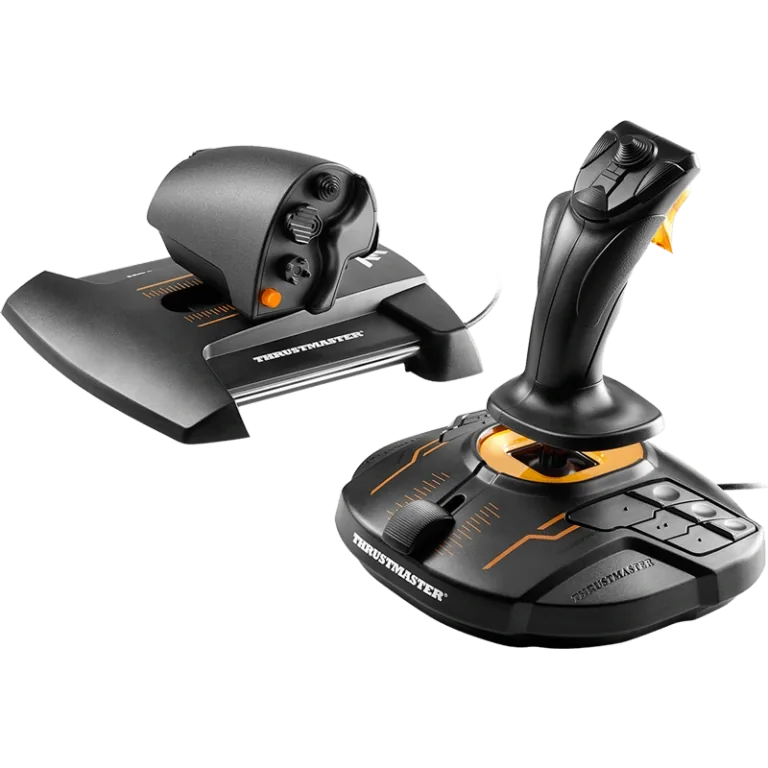
Thrustmaster T.16000M FCS HOTAS
Our verdict:
Best starting Elite Dangerous HOTAS
Best for new players who want Hall-effect sensors and a separate throttle at a lower cost.
View at ThrustmasterKeep in mind: it is PC only, with no console license.
HOTAS & Joysticks
The short answer
The Thrustmaster T.16000M FCS HOTAS is the best starting Elite Dangerous HOTAS because its twist-rudder, Hall-effect stick matches the game's default bindings, and the Thrustmaster Sol-R4 HOTAS is the pick once you want a set built specifically for space combat.
Thrustmaster T.16000M FCS HOTASView at ThrustmasterRead our analysis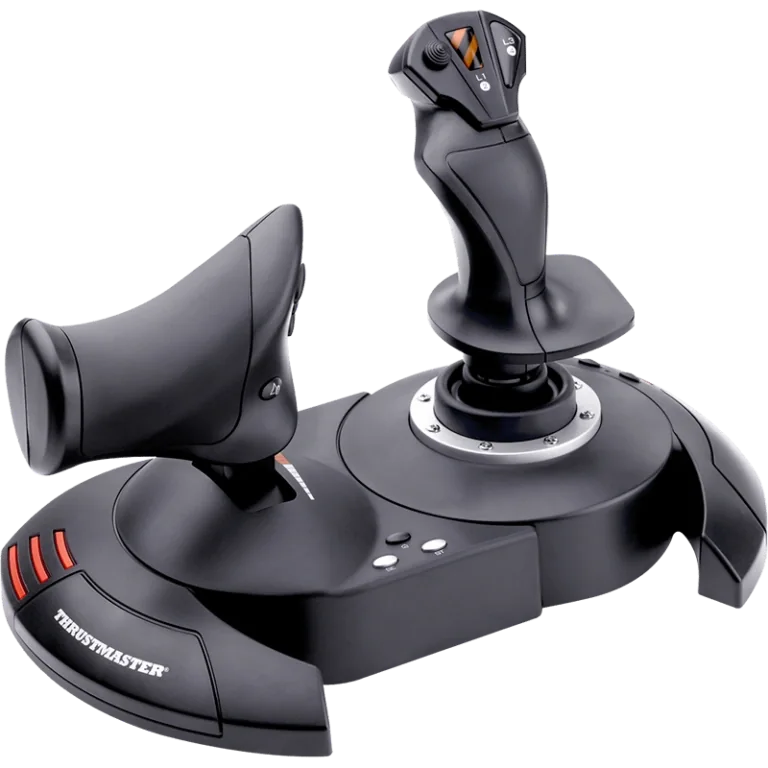 Thrustmaster T.Flight HOTAS XView at ThrustmasterRead our analysis
 Logitech G X56 HOTASView at LogitechRead our analysis
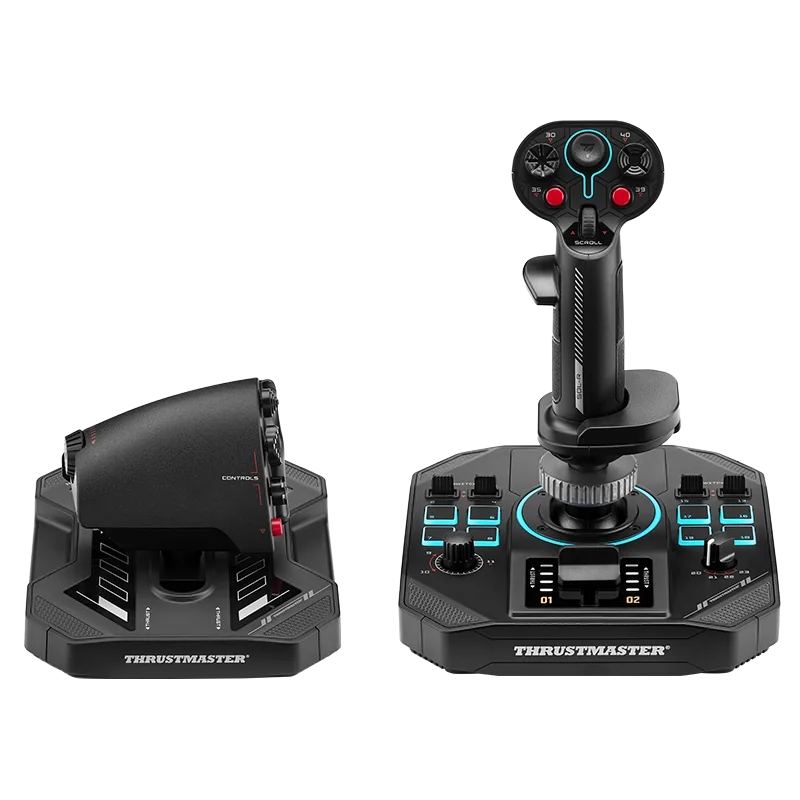 Thrustmaster Sol-R4 HOTASView at ThrustmasterRead our analysis
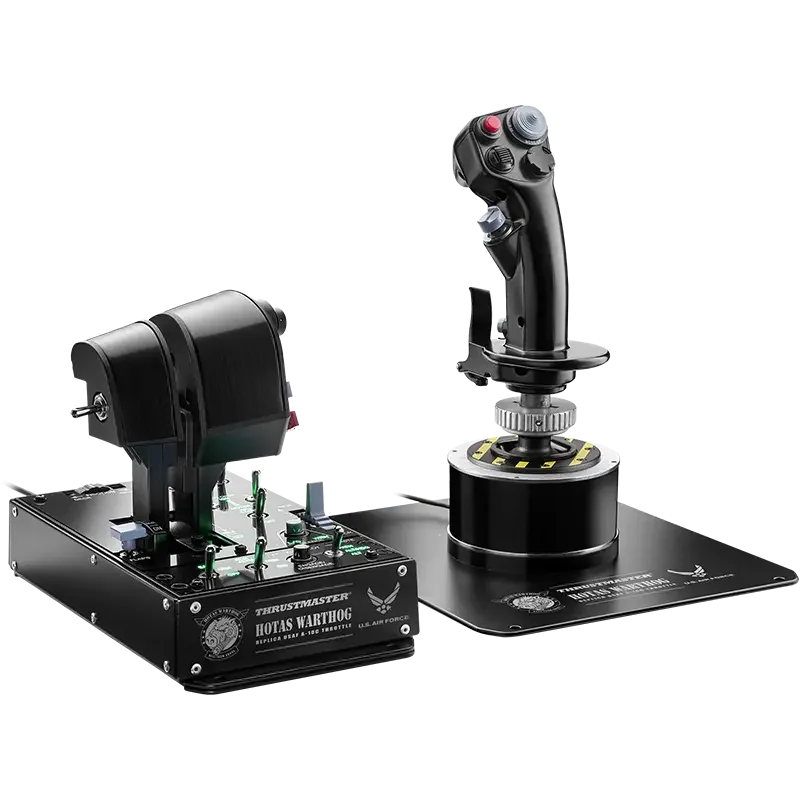 Thrustmaster HOTAS Warthog MKIIView at ThrustmasterRead our analysis
Elite Dangerous is a space-combat and trading sim that you fly with a stick and throttle. The Elite Dangerous HOTAS picks below range from a budget starter to a set built for space combat. That way you can match a HOTAS to how seriously you play, not just to how much you want to spend.
Thrustmaster T.16000M FCS HOTAS
Our verdict:
Best starting Elite Dangerous HOTAS
Best for new players who want Hall-effect sensors and a separate throttle at a lower cost.
View at ThrustmasterKeep in mind: it is PC only, with no console license.
The T.16000M FCS HOTAS pairs a stick with the TWCS throttle. The stick has 4 axes, including a twist rudder that locks, and 16 buttons. The throttle adds 14 more buttons, a slider and a small thumb stick. Both use Thrustmaster's H.E.A.R.T. Hall-effect sensors, the same family found in the higher-end Warthog line.
Many new Elite Dangerous players land on this HOTAS first. The game doesn't require it. It is simply a well-documented twist-rudder stick with enough buttons for your weapons and targeting, plus ship systems. You won't need to dive into a menu mid-fight.
Our verdict:
Best budget Elite Dangerous HOTAS
Best for players who want a complete two-piece HOTAS at the lowest realistic cost.
View at ThrustmasterKeep in mind: it uses standard sensors rather than the Hall-effect technology in the pricier picks here.
The T.Flight HOTAS X pairs a joystick with a full-size throttle that detaches. It has 5 axes and 12 buttons you can program, plus a rapid-fire trigger. It is listed for PC and PS3. You can adjust the stick's resistance to suit combat turns.
Elite Dangerous doesn't demand a certain sensor type. So this is a fair place to start if you want a real stick and throttle without paying for Hall-effect precision right away. Our T.Flight HOTAS X review covers it in full.
Our verdict:
Best alternative-brand Elite Dangerous HOTAS
Best for players who prefer Logitech's software and want independent twin-throttle control.
View at LogitechKeep in mind: it needs more desk space than a single-lever throttle setup.
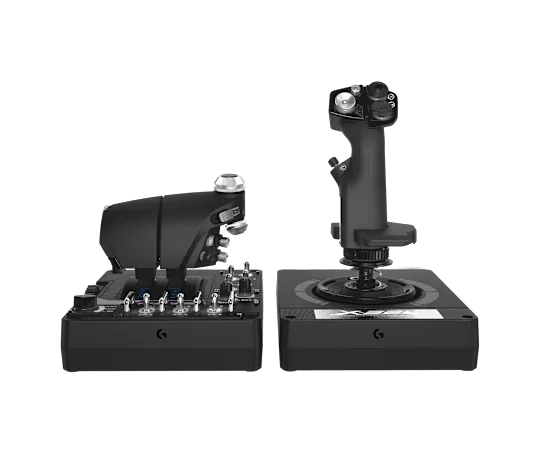
The Logitech G X56 uses 16-bit Hall-effect sensors on pitch and roll. Four swappable springs set how hard the stick pushes back. The throttle has two levers with a friction dial and a lock. Mini analog sticks and RGB lights round it out. It gives Elite Dangerous players a real option outside Thrustmaster's range.
The two throttle levers are more than most Elite ships need, since they fly with one throttle input. Still, combat players can use the second lever for another control in a busy dogfight. Our X56 HOTAS review goes deeper.
Our verdict:
Best space-combat-specific Elite Dangerous HOTAS
Best for players who want the most physical buttons mapped for weapons, countermeasures and ship systems.
View at ThrustmasterKeep in mind: it is a larger, more specialized set than a general-purpose HOTAS, and it is PC only.
The Sol-R4 is built for space-combat games. It has 58 buttons you can program, spread across the grip, the throttle and the base. It uses Hall-effect sensors on all three stick axes. The throttle has a detent you can move to suit your flying style.
That button count is far above the general sticks in this roundup. It suits players who want weapon groups, chaff, shield cells and targeting each on their own button. With fewer buttons, those jobs have to share controls.
Thrustmaster HOTAS Warthog MKII
Our verdict:
Best premium Elite Dangerous HOTAS
Best for players flying enough hours to want a metal-built, long-term setup.
View at ThrustmasterKeep in mind: its dual-lever throttle is not something Elite Dangerous ships specifically need, since they fly with a single throttle input.
The Warthog MKII pairs a redesigned metal base with the A-10C throttle and a Viper stick grip. The grip has 19 buttons, including a 2-stage trigger. The whole system runs on H.E.A.R.T. Hall-effect sensors. That gives it the same basic precision as the T.16000M FCS HOTAS in a much sturdier build.
Elite Dangerous doesn't need the MKII's twin-engine throttle the way a bomber sim would. So the case for it rests on your hours and on how many functions you want on real buttons. The game itself doesn't demand it.
Elite Dangerous doesn't lock you into one brand or model. Its controls menu accepts any device that Windows sees as a game controller. You map the flight axes and dozens of ship functions yourself. What matters is the axis count and the button count, not a logo.
A stick with a twist-rudder axis covers flight controls without pedals. Sixteen or more buttons let you bind weapons, targeting and ship systems without diving into a menu mid-fight.
Elite ships don't have a rudder in the aviation sense, but yaw still matters for combat turns and docking. A twist-rudder stick like the T.16000M FCS HOTAS handles this with no extra hardware. Rudder pedals are an option if you already own a pair from another sim. Most players don't buy them just for this game, since the twist axis does the job for most ships.
Elite Dangerous doesn't need the Warthog MKII's twin throttle or the Sol-R4's full 58 buttons to fly well. The case for either one rests on your hours and on how many ship functions you want on their own buttons. If you fly a few hours a week and mostly trade or explore, the T.16000M FCS HOTAS covers you. If you are deep into PvP combat and want a button for every subsystem, the Sol-R4 or Warthog MKII starts to pay off.
Every stick in this roundup uses Thrustmaster's or Logitech's free mapping software. It lets you save a separate button profile for each ship or role. You might keep one for a combat ship and another for a cargo hauler.
Elite Dangerous also has its own binding presets for common HOTAS models, so you don't start from a blank layout. Many players start from the preset closest to their stick. Then they change the two or three bindings that don't fit how they fly, rather than remapping everything by hand.
Stick drift means the ship slowly rolls or pitches on its own with no input. It is usually a dead zone or calibration issue, not a hardware fault, especially on a brand-new stick. The Windows game controller panel and each maker's software both let you set a small dead zone around center. That soaks up the tiny electrical noise every analog stick has at rest.
A second common issue is a control that feels backward. Inverted pitch is a real matter of taste, not a defect. Elite Dangerous's controls menu lets you flip any axis on its own.
Elite Dangerous asks more of your hands than a plane does. Ships can thrust up, down and sideways as well as forward. Players often map those thrusters to a thumb stick or hat on the throttle. The TWCS throttle's small thumb stick suits this, and so do the X56's mini analog sticks. Check that the throttle you pick has a spare analog input for lateral thrust, or plan to use hat switches instead.
A HOTAS that slides on the desk while you roll into a turn is a real problem in a combat-heavy game like this one. Quick stick moves are common. A clamp-on desk mount or a chair arm keeps the stick and throttle in the same spot every session. That matters more for combat than for slow trading runs. Our HOTAS chair mount roundup covers what to look for if your desk has no room for a clamp.
Elite Dangerous has been out for years, so there is a healthy used market for older HOTAS gear. A used stick can be a real bargain. Check two things before you buy one for combat flying.
First, make sure every button and hat switch still registers cleanly. Second, check that the twist rudder and stick base have no loose play. That is the most common wear point on a stick that has seen years of combat.
A stick with a worn center needs more dead zone than a new one. That costs you some fine control in exchange for the lower price.
New players sometimes think a pricier HOTAS will make them better at the game faster. In practice, time spent flying and learning the bindings matters far more than the stick you start on. A new stick rarely needs anything beyond the default dead zone and curve to feel usable on day one. Most of the setup work is about button jobs, not raw sensitivity, whichever of the five sets above you choose.
This page is for someone who owns or is buying Elite Dangerous and wants a stick that matches how the game is controlled. It is not a general HOTAS list for every sim. If you are still weighing HOTAS against other PC controls, our flight stick for PC roundup covers that wider choice.
Start with the Thrustmaster T.16000M FCS HOTAS for a well-documented twist-rudder stick at a fair cost. Pick the T.Flight HOTAS X if your budget is tighter still. Step up to the Sol-R4 when you want the most buttons for weapons and ship systems, or to the Warthog MKII for a metal build that lasts. The Logitech G X56 is a solid choice if you prefer Logitech's software. Every Elite Dangerous HOTAS here runs on PC, so choose by how many controls you want to map.
No. Elite Dangerous accepts any HOTAS that shows up as a standard PC game controller, and its control bindings menu lets you map every axis and button yourself. The T.16000M FCS HOTAS is just a common starting point because it is inexpensive relative to higher-end sticks and its twist-rudder layout matches how a lot of default binding guides are written.
You can fly with just a stick. Elite Dangerous lets you bind throttle to a slider, a twist axis, or even keyboard keys. A separate throttle unit just gives you a dedicated lever for power, which most players find faster once they are doing combat maneuvers that need quick throttle changes.
Only if you are already flying enough to want metal construction and more mapped buttons. Elite Dangerous does not require the Warthog MKII's dual-lever throttle the way a twin-engine flight sim would, so the upgrade is about durability and button count, not a feature the base game specifically demands.
The Sol-R4 is built and marketed specifically for space combat games, with 58 programmable buttons spread across the grip, throttle and base, plus Hall-effect sensors on all three stick axes. That button count suits Elite Dangerous players who want a dedicated physical control for most ship functions rather than reaching for a menu mid-fight.