X56 HOTAS: Logitech's Dual-Throttle Rhino System Explained in 2026
The short answer
Best for PC simmers who want twin throttle levers and mini analog sticks on both units. If you want a simpler single-throttle system with a multi-function LCD instead, the Logitech G Saitek X52 Pro is worth comparing.
The Logitech G X56 HOTAS pairs a joystick with a throttle unit that has two levers. Its headline feature is a small analog stick built into each half. Those add axes that most single-stick HOTAS sets don't have. It works on PC only. The fastest way to know if it fits how you fly is to understand its two-lever throttle.
Keep in mind: it is PC only, so console players need a different HOTAS entirely.
What's actually in the X56 HOTAS system
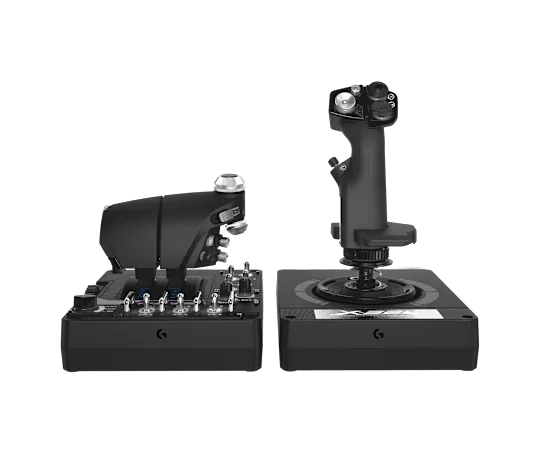
The main stick uses Hall-effect sensors on its pitch and roll axes, at 16-bit resolution. Both the stick and the throttle have a mini analog stick. That gives you four extra axes on top of the main controls.
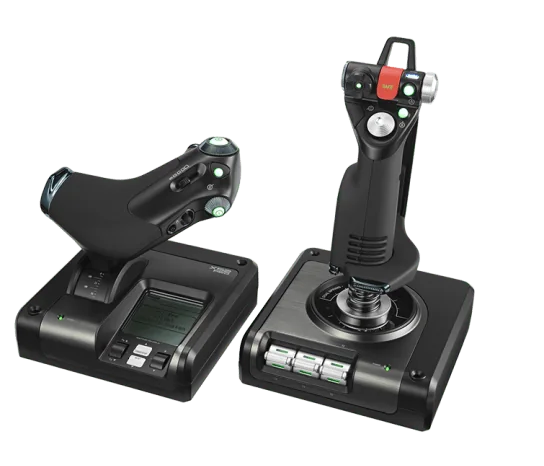
The throttle has two levers that can move on their own. It also has a friction dial and a throttle lock. You can change how stiff the stick feels with a 4-spring system. Logitech added RGB lights across both units, which is more a desk look than a flying feature.
Why twin throttle levers, specifically
Thrustmaster's HOTAS Warthog throttle also uses two levers. On the X56, the two levers exist for aircraft that need a throttle for each engine. That matters most for twin-engine warbirds, some space-combat ships and multi-engine airliners. If you fly mostly single-engine planes, a second lever adds work without adding much real control. A single-lever HOTAS handles that flying just as well and takes less desk space.
The mini analog sticks are the real differentiator
Most rival HOTAS sets at this level have no second analog stick on either unit. The X56 has one on the main stick and one on the throttle. Together they give you four axes of fine control beyond pitch, roll and throttle. Simmers often map them to camera look or to fine trim. In games that support layered axis input, they can also handle small position changes.
Meet the Logitech G Saitek X52 Pro
The X56's two levers and mini-sticks may be more control than you need. If so, Logitech's own X52 Pro is the simpler sibling to compare. It has one throttle with a built-in LCD screen and lit buttons. The throttle's stiffness can be set, and it has idle and afterburner detents. The stick uses non-contact sensors on its X and Y axes, and the handle adjusts to 5 positions for different hand sizes.
Keep in mind: it does not have the X56's twin throttles or mini analog sticks.
Pick the X52 Pro if a single throttle and an onboard screen sound like a better fit than the X56's extra controls. Our flight stick for PC roundup compares both with other PC sticks.
Connection and platform
The X56 uses two USB cables, one for the stick and one for the throttle. It has no Xbox or PlayStation license. That matches most PC-focused HOTAS brands. A controller has to be built and licensed for a console to work there, and the X56 simply is not. If you play on Xbox, our Xbox flight stick roundup covers licensed options.
How it compares to the rest of the field
Against Thrustmaster's HOTAS Warthog, the X56 gives up the metal build but adds the mini-stick axes. It sits well below the Warthog's all-metal flagship tier. Against VKB's modular lines, the X56 is a simpler one-box bundle.
You don't build it from a separate base, grip and throttle. That suits simmers who want one purchase rather than several part choices. Our VKB HOTAS guide explains the other approach.
Where the X56 name comes from
The X56 line started under Saitek, before Logitech bought the brand. That is why many listings carry both names. The history matters mainly for software and drivers.
Logitech now looks after the profile software and firmware for the line. So expect Logitech's own setup tools, not old Saitek software, even though the design traces back to Saitek. The X52 Pro shares the same Saitek-to-Logitech history.
What flying feels like on the X56 versus the X52 Pro
The two systems change what your hands do in flight, not just the spec sheet. On the X56, your throttle hand has a second lever to manage and a mini-stick to reach for. That suits combat and space-sim players who really use the extra input for weapons or other systems.
On the X52 Pro, one lever and the onboard screen keep your throttle hand on one job. The screen gives you a quick check of your active profile without looking away for long. Neither design is better in every case. It comes down to whether the extra X56 controls map to something you will use in the sims you fly.
Desk footprint and cable management
The X56's stick and throttle each need their own USB cable. So plan for two cable runs instead of one. That is worth knowing if you route cables through a sim rig or a desk hole. The two-lever throttle also takes more desk width than the X52 Pro's single lever. It is built to hold two full-length levers side by side.
Software and profile switching
Both the X56 and the X52 Pro map through Logitech's own setup software. You can save a named profile for each game and switch between them without remapping each time. On the X56, the software also handles the mode switching behind the mini-sticks. So one small stick can do different jobs, based on which profile or mode is active.
On the X52 Pro, the throttle's screen shows the active profile right on the unit. That is a small but real help if you fly several sims. You get a reminder of which setup is loaded before you take off.
Who the X56 HOTAS suits
The X56 is built for PC simmers who want two throttle levers and extra axes from built-in mini-sticks, all in one box. Maybe you fly mostly single-engine planes and don't need the second lever or the extra axes. Then the X52 Pro's single throttle and screen will cover the same flying. It takes less desk space and has fewer controls to learn.
Verdict: X56 or the simpler X52 Pro
The X56 HOTAS is best for PC simmers who want two throttle levers and mini analog sticks on both units. It has the widest control count in Logitech's flight lineup. If you want a simpler single-throttle set with a built-in screen, the Logitech G Saitek X52 Pro is the better fit. If you need a console setup, neither model works, since both are PC only.
FAQ
Does the X56 work on Xbox or PlayStation?
No. The X56 is a PC-only HOTAS with no console licensing.
Why does the X56 have two throttle levers?
The twin throttle design mirrors twin-engine aircraft, where each engine benefits from its own independent throttle input, similar in concept to the dual-lever design on Thrustmaster's HOTAS Warthog throttle, though built differently.
What are the mini analog sticks for?
Each unit, the main stick and the throttle, includes its own small analog mini-stick. These are commonly mapped to camera or view control, or to secondary flight-surface trim in sims that support it.
How does the X56 compare to the X52 Pro?
The X56 has twin throttles, mini analog sticks on both units, and RGB lighting. The X52 Pro has a single throttle with a built-in multi-function LCD and idle and afterburner detents. If you want the highest control count and do not mind two throttle levers, the X56 fits; if you want a simpler single-throttle setup with an onboard display, the X52 Pro fits.