The Thrustmaster T.Flight HOTAS One is the best all-around flight stick because it is licensed for both Xbox and PC, and the Thrustmaster HOTAS Warthog Flight Stick is the pick for PC simmers who want an all-metal build that holds up over years of hard use.
Flight sticks range from a simple one-piece joystick to a metal stick with Hall-effect sensors made for years of hard use. The picks below cover PC-only and Xbox-licensed hardware, in budget and premium builds. Simple layouts sit next to button-heavy ones, so you can match a stick to how you really fly.
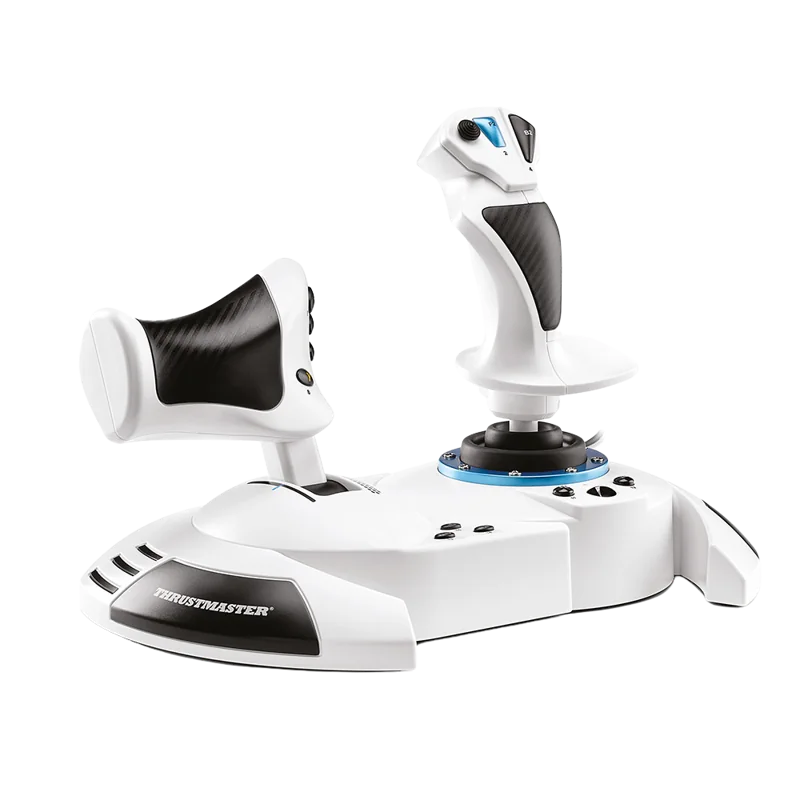
#1. Thrustmaster T.Flight HOTAS One: best flight stick for Xbox and PC
Keep in mind: the throttle is built for use with a stick, not sold as a bare single stick.
The T.Flight HOTAS One is officially licensed for Microsoft Flight Simulator on Xbox Series X|S and PC. That puts it in a small group of sticks that really work on a console. It has 5 axes, 14 buttons and a rapid-fire trigger.
The throttle detaches, so you can run it on a desk or on your lap. Most PC-only sticks in this roundup will never connect to an Xbox. So this is the pick if console flying matters to you.
Rudder pedals aren't included. You can add Thrustmaster's TFRP pedals later, sold on their own. That keeps the first purchase simple while leaving room to grow. If you fly casually on Xbox and want one box that plugs in and works, this is the most direct route.
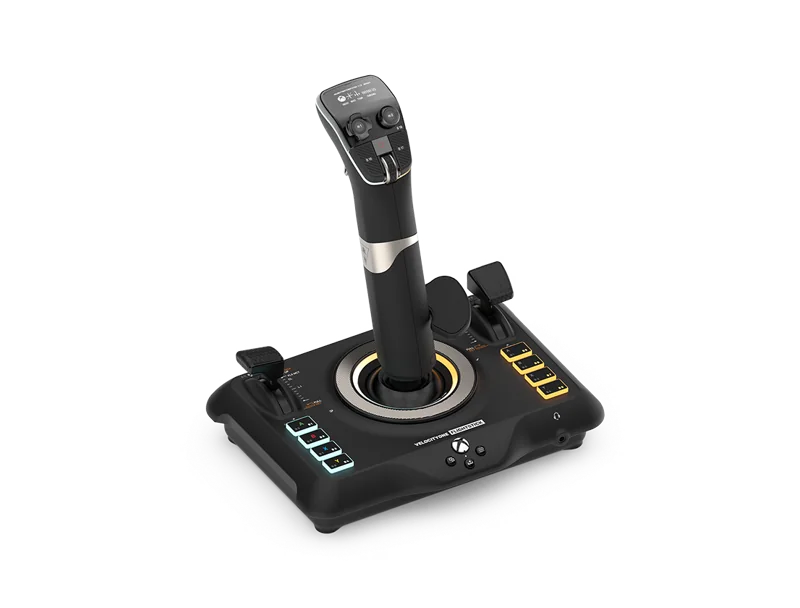
#2. Turtle Beach VelocityOne Flightstick: best flight stick with a built-in display
Keep in mind: it is a larger single unit than a bare joystick, so desk space matters more.
The VelocityOne Flightstick packs 27 buttons, 8 axes and a POV hat into one stick. Throttle and flap levers are built into the base. A small OLED screen shows flight data. It works on Xbox Series X|S, Xbox One and PC. So it covers the same console ground as the HOTAS One, but folds the throttle into the same unit.
That built-in throttle is the main trade-off to understand. You don't pair a stick with a full-size detachable throttle, as a classic HOTAS does. The throttle has a shorter motion and lives on the same base as the stick. For pilots who want fewer cables and one combined unit, that is a fair trade.
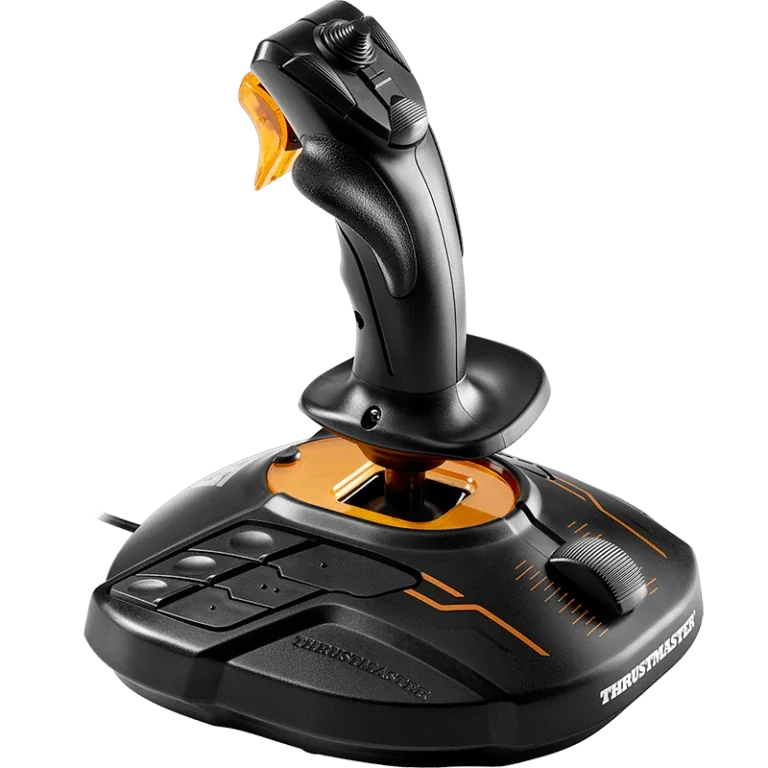
#3. Thrustmaster T.16000M FCS Joystick: best budget PC flight stick
Keep in mind: it is PC only, with no Xbox or PlayStation license.
The T.16000M FCS uses Thrustmaster's H.E.A.R.T. Hall-effect sensors. That is the same sensor family used in Thrustmaster's higher-end Warthog line.
So a lower cost here doesn't mean a less precise stick. It has 16 buttons, an 8-way hat and 4 axes, including a twist rudder. It works for either hand, with three parts that swap for left- or right-hand use.
It ships as a stick alone, with no throttle. That keeps the cost down if you want to bind throttle to the twist axis or a slider for now. Since it shares sensor tech with pricier Thrustmaster gear, it is a common first step for PC simmers who plan to build a full HOTAS over time.
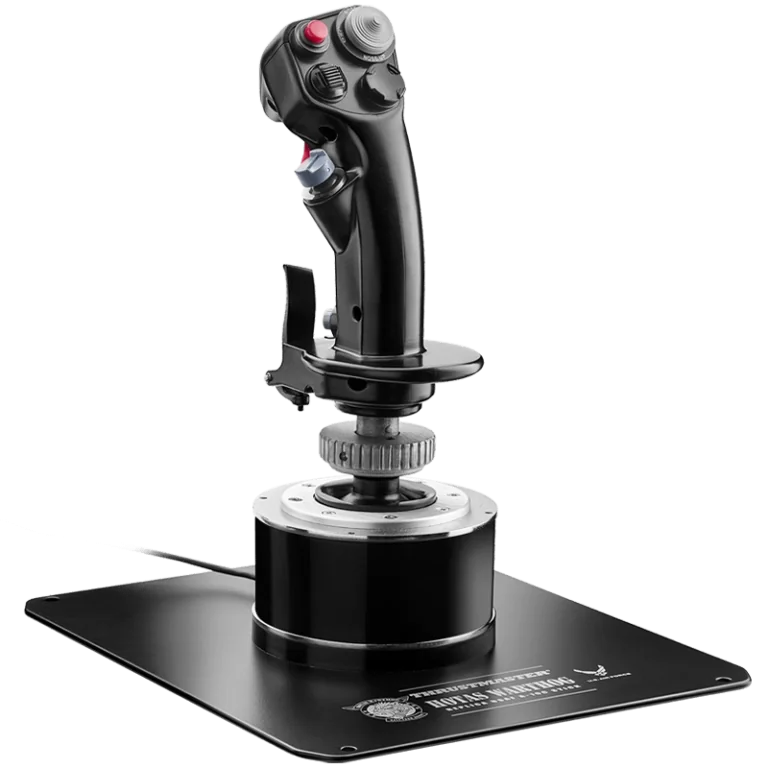
#4. Thrustmaster HOTAS Warthog Flight Stick: best premium PC flight stick
Keep in mind: it is a large, heavy stick built for a permanent desk or cockpit setup, not a stick you move around often.
The HOTAS Warthog Flight Stick is an all-metal copy of the A-10C stick. It weighs over 6 pounds on its own. Its Hall-effect sensors read each axis at 16-bit resolution. It has 19 buttons, three 8-way hats and a metal dual trigger, all programmable in Thrustmaster's free T.A.R.G.E.T.
software. That is far more hardware than the T.16000M FCS. It aims at simmers who want the sturdiest base, not the cheapest one.
It works on PC only, with no console license of any kind. It is sold as the stick half of the Warthog set, without the matching dual throttle. Simmers building a full Warthog HOTAS usually buy the Warthog Dual Throttle on its own to pair with it. Our Warthog joystick review goes deeper.
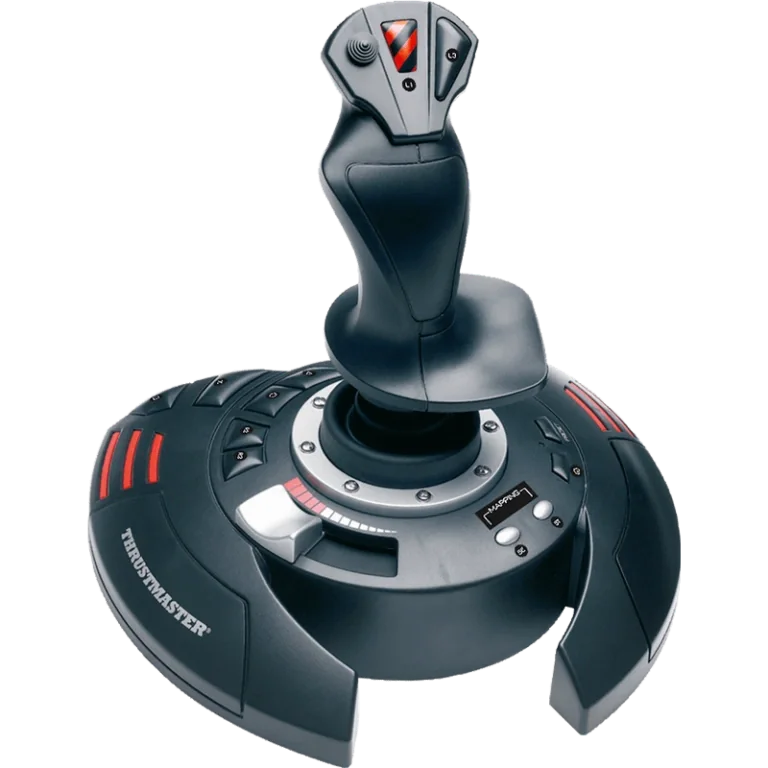
#5. Thrustmaster T.Flight Stick X: best simple flight stick for casual flying
Keep in mind: it has fewer buttons than the other sticks here and no separate throttle.
The T.Flight Stick X keeps the stick and throttle slider on one weighted base. It has 12 action buttons and four programmable axes. Its twist grip handles rudder input and can be locked if you add pedals. Thrustmaster lists PC and PS3 support. It suits casual flying when you want one unit to plug in, rather than a stick and separate throttle.
If you later want a real throttle hand or Hall-effect precision, the T.16000M FCS above is the natural next step. It builds on the same idea rather than replacing it.
Factors to consider when choosing flight sticks
Single-stick vs a stick built for a HOTAS
A single stick like the T.Flight Stick X handles pitch and roll, and usually yaw through a twist grip. It all comes from one unit with no separate throttle. A stick built to pair with a throttle, like the T.16000M FCS or the Warthog Flight Stick, frees your other hand for a real throttle lever once you add one. Decide this first, since it changes what else you'll buy later.
Hall-effect vs standard sensors
A standard sensor reads position by touching a track. That track wears a little over time and can cause drift. A Hall-effect sensor reads position with magnets and nothing touching. The H.E.A.R.T.
system in the T.16000M FCS and the Warthog Flight Stick works this way. It holds precision longer under heavy use. If you plan to fly for years rather than a season, that difference is worth paying for.
PC-only vs console-licensed
This trade-off trips up buyers who assume any USB stick works everywhere. The T.16000M FCS and Warthog Flight Stick are PC only. The T.Flight Stick X also lists PS3, but not Xbox or newer PlayStation consoles. The T.Flight HOTAS One and VelocityOne Flightstick are the exceptions here.
They are built and licensed for Xbox as well as PC. If a console matters to you, confirm the license on the listing before you buy. It is a hardware rule, not something a software update changes later.
Button and axis count
Button count is a quick way to judge how much a stick can handle before you outgrow it. It is not the whole story. The VelocityOne Flightstick has 27 buttons and 8 axes for pilots who want more controls on one unit. The T.Flight Stick X's 12 buttons are plenty for simpler planes. Match the count to what you fly rather than picking the biggest number.
Software and mapping
You can set up every stick here in your sim's own controls menu. The PC-only models also support maker software. Thrustmaster's T.A.R.G.E.T. tool can treat a stick and a separate throttle as one device. It can also put macros on single buttons and save a separate profile for each game.
The T.Flight Stick X has its own button and axis programming. Do not assume it uses the same mapping software as the T.16000M or Warthog. If you fly more than one sim, check how each device stores your bindings.
VR use
If you fly in a VR headset, stick layout matters more, since you can't glance down to find a switch. Any of these sticks can work in VR once you learn the buttons by feel. A stick with more hats and switches spread out takes longer to learn than a simple 12-button layout. The VelocityOne Flightstick has the denser layout here; the T.Flight Stick X has fewer buttons to learn. Practice the layout outside VR first, so your hand finds buttons once the headset goes on.
Twist-rudder vs pedals, by stick
Rudder input deserves its own look, because each stick handles it differently. That changes what else you'll need. The T.16000M FCS and the T.Flight Stick X both build yaw into the stick with a twist grip. You get roll, pitch and yaw from one unit with no extra hardware.
The HOTAS One and VelocityOne Flightstick handle rudder through stick rotation or a lever on the base. You get a choice of method on the same unit.
If you want pedals now or later, a twist-rudder stick isn't wasted money. Unbind the twist axis once the pedals are in, and keep using the stick's roll and pitch axes as normal. None of these sticks need pedals to fly. Pedals add to what the sticks already do. Our rudder pedals roundup covers the options.
Grip material and switch quality
Grip and switch materials matter for a reason. They are the parts your hands touch every session, and they tend to fail first on a cheaper stick. The Warthog Flight Stick's all-metal grip is the clearest example of a maker building for hands-on wear, not just button counts.
The T.16000M FCS uses lighter plastic. The T.Flight Stick X puts its throttle slider on the joystick base. A separate throttle needs more room but gives your other hand its own lever.
None of this shows up in a spec sheet's headline numbers. That is why it pays to read past button and axis counts. A stick with fewer buttons but a sturdier base can serve you longer than one with more buttons and a lighter build.
Mounting and desk setup for flight sticks
A stick that shifts under load changes your inputs without you touching anything. That matters more with a heavy stick like the Warthog than with a light one. A clamp-on mount works for most solid desks with no drilling. Set it low enough to put your grip at a natural elbow height.
Wobble usually comes from a few causes, not a weak clamp design. The clamp may not sit flat on the desk. Dust or oil may cut its grip. Or the desk may flex under load. Our HOTAS chair mount roundup covers mounts in more depth.
How to actually choose
Start with your platform. On Xbox, your choices narrow right away to the T.Flight HOTAS One or the VelocityOne Flightstick. The T.16000M and Warthog are PC only. The T.Flight Stick X adds PS3 support, but no Xbox support.
On PC, decide how much you plan to fly. An occasional flyer is well served by the T.Flight Stick X. A regular flyer benefits from the T.16000M FCS's Hall-effect sensors. A simmer who will fly combat aircraft for years is the audience for the Warthog Flight Stick and its all-metal build.
Don't lean too hard on button counts when comparing these five. Sensor type, build quality and platform licensing matter more for long-term happiness than the bigger number on a spec sheet.
A worked comparison: three ways to spend on a first stick
Picture three simmers with different goals. The first wants the simplest setup and won't fly more than a few hours a week. The T.Flight Stick X fits that case well, as one unit with 12 buttons and a built-in throttle slider.
The second wants Hall-effect precision without paying for a metal build. The T.16000M FCS fits, at a lower price than the Warthog Flight Stick, and it leaves room to add a matched throttle later. The third flies demanding planes often enough to want a metal build made for years of daily use.
That is the Warthog Flight Stick's case to make, though it is bigger and heavier than the other two. None of these three is a wrong answer. They serve different flying habits.
Verdict: which of these flight sticks to buy
Buy the Thrustmaster T.Flight HOTAS One if you want one stick that works on both Xbox and PC, with no guesswork on licensing. Buy the Thrustmaster HOTAS Warthog Flight Stick if you are firmly on PC and want an all-metal build that still feels solid after years of flying. For everyone in between, the T.16000M FCS is a Hall-effect stick at a lower cost.
The T.Flight Stick X is the simplest starting point. The Turtle Beach VelocityOne Flightstick adds Xbox support and built-in levers. Whichever of these flight sticks you pick, check the platform before you buy.
FAQ
Do I need a HOTAS or is a single flight stick enough?
A single stick like the Thrustmaster T.Flight Stick X covers roll, pitch and a set of programmable buttons from one unit, which is enough for casual flying or a first purchase. A HOTAS pairs that stick with a separate throttle, which matters more once you fly regularly or fly aircraft with real engine management.
What actually separates a budget flight stick from a premium one?
Build material and sensor type matter more than the spec sheet's headline numbers. The Thrustmaster HOTAS Warthog Flight Stick uses an all-metal grip and base with Hall-effect sensors, which hold their precision longer under heavy use than the lighter plastic construction on an entry-level stick.
Will any of these flight sticks work on Xbox?
Only the Thrustmaster T.Flight HOTAS One and the Turtle Beach VelocityOne Flightstick in this roundup are built for Xbox, alongside PC. The T.16000M FCS and HOTAS Warthog Flight Stick are PC only. The T.Flight Stick X also lists PS3 support, but no Xbox support.
Does a higher button count actually matter?
Only to a point. A stick with more buttons and hat switches suits complex combat aircraft with a lot of switches to reach, but base and gimbal quality tend to matter more for long-term satisfaction than raw button count alone.